4
Claude Code now knows how to wait out the limit and then carry on
From mid-August 2026, a Claude Code session in the terminal no longer freezes when you hit the usage ceiling. It sits and waits, then picks the work back up right as the limit resets. The community had been asking for this feature for months, through at least five duplicate issues on GitHub.
What exactly it does
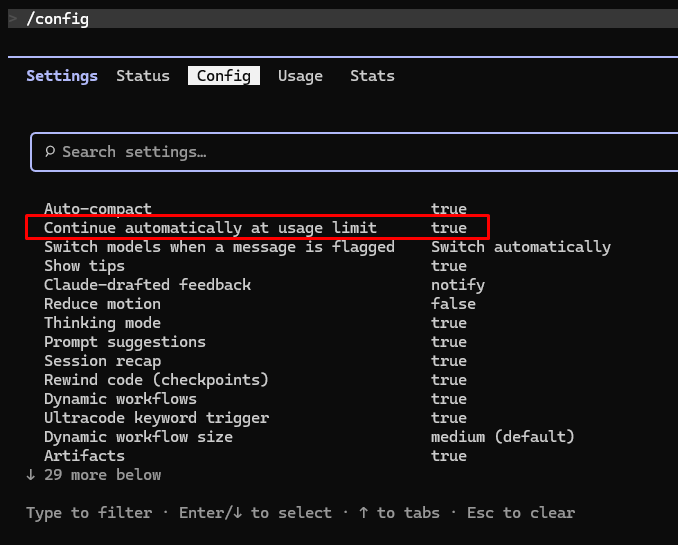
Version v2.1.234 notes in the changelog that Claude Code will automatically continue a session when a claude.ai usage limit resets, and that this can be turned off in /config under "Continue automatically at usage limit". It is on by default, for interactive sessions signed in with a claude.ai subscription account.
When a limit stops you midway, the status line at the bottom of the session appears: Usage limit reached · continuing automatically at 3:45pm · esc to cancel. At the reset time, that line changes to a continuing status and Claude Code sends the model a fixed prompt to pick up the unfinished work.
This detail matters more than it appears: the documentation states plainly that Claude Code does not resend your last message. It composes a continuation nudge of its own. If your original request was long and full of constraints, what comes back after the reset is the old context plus a generic prod, not a copy of your instructions.
A few days earlier, the Desktop build had gained its own checkbox called "Auto-continue when limits reset" on the session limit card. The two switches are independent, so turning one off does not turn off the other.
The part of the documentation few people read to the end
The feature is often summed up in a single sentence: no more watching the clock, run tasks overnight with ease. The documentation page on interactive mode paints a different picture.
Claude Code does not offer to wait at all in background sessions or in -p runs. Yet that is precisely the mode of running repeatedly cited in the issues demanding this feature. With API keys, cloud providers and usage-billed models, the documentation says outright that there is nothing to wait for, because usage there is measured per request.
If the computer sleeps for more than about 30 minutes and the limit resets during that time, the session does not continue on its own; you have to press Enter. In other words, closing the laptop lid and going to bed breaks the scenario.
Permissions are still requested as usual. A resumed task can stop dead at a permission dialogue while you are away, and sit there until morning.
If you hit the limit again, Claude Code automatically re-enters waiting mode up to two consecutive times and then stops for good. And when the reset point is more than 24 hours away — say a weekly limit falling several days later — it does not start waiting mode on its own. The weekly limit card on Desktop has no corresponding checkbox either.
Why Anthropic is so cautious
The answer lies in one dry line of the configuration documentation. You can turn the feature off with /config autoContinueAtUsageLimit=false, which also works with -p. But that key=value form cannot turn it back on, and the reason the documentation gives is that this setting grants permission to execute without human supervision.
That is a statement of principle, not a technical limitation. Anthropic lets you disable automatic execution with a quick command, but does not let you re-enable it with that same command. Every limitation above is consistent with that principle: waiting mode exists only where a human is sitting in front of the terminal.
There is a practical reason too. The documentation states plainly that usage is deducted from the session limit and the weekly limit at the same time. Automatically spending a freshly opened window straight away, over and over, is the fastest way to push yourself to the weekly ceiling — the one thing an extra hour of waiting cannot rescue.
Three things worth doing
Check your version: the feature requires v2.1.234 or later. Open /config and see what state "Continue automatically at usage limit" is in, because it is on by default and it will run without you noticing.
When Claude Code does not offer to wait — in a Remote Control session or an agent team teammate session, for instance — type /rate-limit-options and choose the manual wait option. Press Esc at an empty prompt to cancel.
With CI and headless workflows, do not count on this feature. Community wrappers such as claude-auto-retry or claude-limit-relay remain a viable route, or move the unattended portion of the work entirely to a per-request billing endpoint.
The boundary Anthropic is holding
What the community is demanding is an agent that runs all night without a human. What it gets is an agent that makes coffee with you: it waits while you step away from your desk, as long as you stay nearby.
The gap between those two things is not an unpaid technical debt. It is a boundary Anthropic is deliberately holding, and the while true loops users write themselves to cross exactly that boundary are more worth discussing than the checkbox itself.
Source: Error reference — Claude Code Docs; Interactive mode — Claude Code Docs; What's new, Week 33 · August 10–14, 2026; Claude Code release notes (archived changelog); Issue #35744, anthropics/claude-code.
Comments
No comments yet. Be the first!
You need to sign in to comment.