14
Guide to using the Vietnamese-Japanese Excel/Word document translation tool
A detailed guide on translating Excel and Word files from Vietnamese to Japanese (and vice versa) using an integrated tool — free of charge or with a personal API key for faster and more accurate translation.
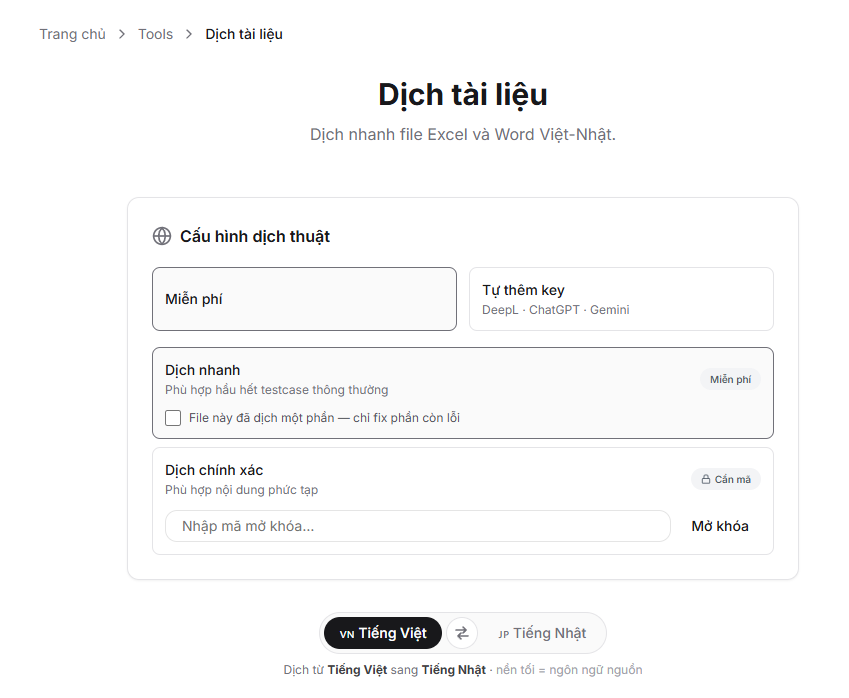
The Document Translation tool supports translating .xlsx (Excel) and .docx (Word) files between Vietnamese and Japanese. No installation is required — simply access the site, upload your file, and click translate.
Accessing the tool
Go to the Tools → Document Translation menu or directly access the link Document Translation. https://note-blog.com/tools/translate
Step 1 — Select translation mode
There are two modes:
Free (no API key required)
Select Free and choose one of two options:
- Quick Translation — Suitable for most standard test cases. Fast and cost-free.
- Accurate Translation (requires unlock code) — For complex content with many technical terms.
⚠️ The free mode uses shared resources, so it may occasionally be slow or fail to translate an entire large file.
Add your own API key (Recommended)
If you have your own API key, select Add your own key for faster translation and dedicated resources.
Recommended order:
1. DeepL — Fastest, most accurate
DeepL is the best choice for Vietnamese-Japanese technical documents. The free plan offers 500,000 characters per month — sufficient for most needs.
- Register at deepl.com/pro-api (select Free)
- Go to Account → API Keys → copy the key
- Paste it into the API Key field, select the DeepL tab
2. Gemini — Free, flexible
Google Gemini offers a generous free tier. Choose Flash Lite to avoid hitting rate limits when translating large files.
- Visit aistudio.google.com → Get API Key
- Paste the key into the API Key field, select the Gemini tab
- After entering the key, select the Flash Lite model (less prone to request limits than Flash)
3. ChatGPT (OpenAI)
Suitable if you already have an OpenAI account with available credit.
- Go to platform.openai.com/api-keys → create a new key
- Paste it into the API Key field, select the ChatGPT tab
- Choose your desired model from the displayed list
💡 The API key is never stored on the server — it is only used during the current translation session.
Step 2 — Select translation direction
Click the ⇄ arrow button to change direction:
- 🇻🇳 → 🇯🇵 : Translate from Vietnamese to Japanese
- 🇯🇵 → 🇻🇳 : Translate from Japanese to Vietnamese
The language with a dark background = the source language (the language of your original file).
Step 3 — Upload file
Drag and drop or click on the upload area to select a file. Supported formats:
.xlsx— Excel (preserves formatting, colours, and styles).docx— Word (output as plain text, formatting not preserved)
Limit: maximum 20MB per file.
Step 4 — Translate and download
Click Translate now and wait. The time depends on file size and the provider being used (typically 30 seconds to 5 minutes).
Partial translation
If the file is too large and exceeds the 300-second limit, the system will automatically export a partially translated file named *_partial.xlsx.
To translate the remaining content:
- Download the
_partial.xlsxfile - Re-upload that file to the tool
- Tick the box "This file has been partially translated — only fix the remaining errors"
- Click Translate now — the tool will only translate the untranslated parts, skipping completed sections
Repeat until the file is 100% fully translated.
Frequently asked questions
My Excel file has multiple sheets — can it be translated?
Yes. The tool automatically scans and translates all sheets in the file.
Will formulas, numbers, and colours be lost?
No. Only cells containing text will have their content changed. Formatting, colours, and borders remain intact.
Should I choose Flash or Flash Lite for Gemini?
For large files (many sheets, many cells), choose Flash Lite to avoid request limits. Flash provides better results but is more prone to rate limiting.
Is my API key stored?
No. The key exists only within the translation request and is not recorded in the database or logs.
Comments
No comments yet. Be the first!
You need to sign in to comment.