2
Claude Code series, part 4: Hooks, the rules Claude Code enforces itself
CLAUDE.md is only advice, whereas hooks are hard locks. This guide shows how to write two PowerShell hooks: one that stops Claude deleting uncommitted changes, and one that checks whether a website loads external libraries. As a result, Claude cannot bypass your rules.
Article 3 closed on a gap: CLAUDE.md and skills are only advice, and Claude can ignore them. Hooks are commands you write, which Claude Code runs automatically at fixed points, and Claude does not get to choose. This article adds to claude-lab a hook that blocks commands deleting uncommitted changes and a hook that checks index.html after every edit.
The commands in this article are for Windows PowerShell; macOS or Linux users should consult the official documentation for the differences.
Table of contents
- Step 1: Write the hook that blocks commands deleting changes
- Step 2: Write the hook that checks after every edit
- Step 3: Register and dry-run the two hooks
- Step 4: Try the checking hook
- Step 5: Let Claude commit
- Step 6: Try the blocking hook
- What hooks cannot do
Step 1: Write the hook that blocks commands deleting changes
The hook receives JSON data via standard input and replies with an exit code: 0 means no objection, 2 means block, with a line written to stderr as the reason sent to Claude.
The first hook attaches to the PreToolUse event, runs before every shell command from Claude, and blocks commands that could wipe uncommitted work such as git reset --hard, git clean -f, git checkout -- ., git restore, git stash drop, Remove-Item -Recurse. This list is not exhaustive; it only catches the most common commands. In claude-lab:
mkdir .claude\hooks
notepad .claude\hooks\chan-lenh.ps1
If Notepad asks whether to create a new file, choose Yes. Paste the following content and save:
$ErrorActionPreference = 'Stop'
$vao = [Console]::In.ReadToEnd() | ConvertFrom-Json

$lenh = $vao.tool_input.command
$mau = '(?m)(^|[;&|({])\s*(git(\s+-C\s+\S+)?\s+(reset[^;&|

]*--hard|clean[^;&|

]*\s-\S*f|checkout[^;&|

]*\s--(\s|$)|checkout\s+\.|restore(?!\s+--staged\s+[^-])|stash\s+(drop|clear))|Remove-Item\b[^;&|

]*\s-r|rm\s+-\S*r)'

if ($lenh -match $mau) {
  [Console]::Error.WriteLine('Hook chan: lenh nay co the xoa thay doi chua commit. Hay de nguoi dung tu chay.')
  exit 2
}
exit 0
The message is deliberately written without diacritics. Notepad saves UTF-8 without a BOM, and Windows PowerShell 5.1 reads such files using the old Windows code page, so accented characters in the script would break.
Step 2: Write the hook that checks after every edit
CLAUDE.md says not to add libraries. The second hook turns that instruction into a check: after every time Claude edits or writes an HTML file (the PostToolUse event), the script looks for <script> or <link> tags loading from outside.
notepad .claude\hooks\kiem-thu-vien.ps1
$vao = [Console]::In.ReadToEnd() | ConvertFrom-Json

$file = $vao.tool_input.file_path
if ($file -notmatch '\.html?$') { exit 0 }
$noidung = Get-Content -Raw -Encoding UTF8 -LiteralPath $file
if ($noidung -match '<(script|link)\b[^>]*\b(src|href)\s*=\s*\S?(https?:)?//') {

  [Console]::Error.WriteLine("Hook: $file nap file tu ben ngoai. CLAUDE.md cam them thu vien, hay go ra.")
  exit 2
}
exit 0
PostToolUse runs once the file has already been edited, so code 2 here does not undo anything; it only sends a reminder for Claude to fix it itself.
Step 3: Register and dry-run the two hooks
Hooks are declared in .claude\settings.json, a file that already has ask rules for commit, push and repo creation from article 3. Type notepad .claude\settings.json, replace everything with the version below; the permissions section stays as in article 3, with only the hooks section added:
{
  "permissions": {
    "ask": [
      "PowerShell(git commit *)", "Bash(git commit *)",
      "PowerShell(git push *)", "Bash(git push *)",
      "PowerShell(gh repo create *)", "Bash(gh repo create *)"
    ]
  },
  "hooks": {
    "PreToolUse": [
      {
        "matcher": "Bash|PowerShell",

        "hooks": [
          {
            "type": "command",
            "command": "powershell.exe",
            "args": ["-NoProfile", "-ExecutionPolicy", "Bypass", "-File", "${CLAUDE_PROJECT_DIR}/.claude/hooks/chan-lenh.ps1"],
            "onFailure": "block"
          }
        ]
      }
    ],
    "PostToolUse": [
      {
        "matcher": "Edit|Write",

        "hooks": [
          {
            "type": "command",
            "command": "powershell.exe",
            "args": ["-NoProfile", "-ExecutionPolicy", "Bypass", "-File", "${CLAUDE_PROJECT_DIR}/.claude/hooks/kiem-thu-vien.ps1"]
          }
        ]
      }
    ]
  }
}
matcher selects the hook tool to monitor. On Windows, Claude runs commands with the PowerShell tool, or with the Bash tool if the machine has Git Bash; the test run uses both. Miss either word and the hook overlooks half of all commands. "onFailure": "block" means that if the script errors or has a wrong path, the command is blocked; without it, a broken hook lets every command through. The line $ErrorActionPreference = 'Stop' at the top of the script ensures that a mid-way error also counts as a failure.
Before handing the hook to Claude, dry-run it right in PowerShell, without touching git:
'{"tool_input":{"command":"git reset --hard"}}' | powershell -NoProfile -ExecutionPolicy Bypass -File .claude\hooks\chan-lenh.ps1; $LASTEXITCODE
You should see the line "Hook chan: ..." and the number 2.
 Image 3a. Dry run of the blocking hook: message and exit code 2
If PowerShell says scripts are not allowed to run, the company machine may have locked it down; in that case the blocking hook will block every Claude command, so remove the hooks section and ask IT.
Type tree /f .claude to check the folder tree.
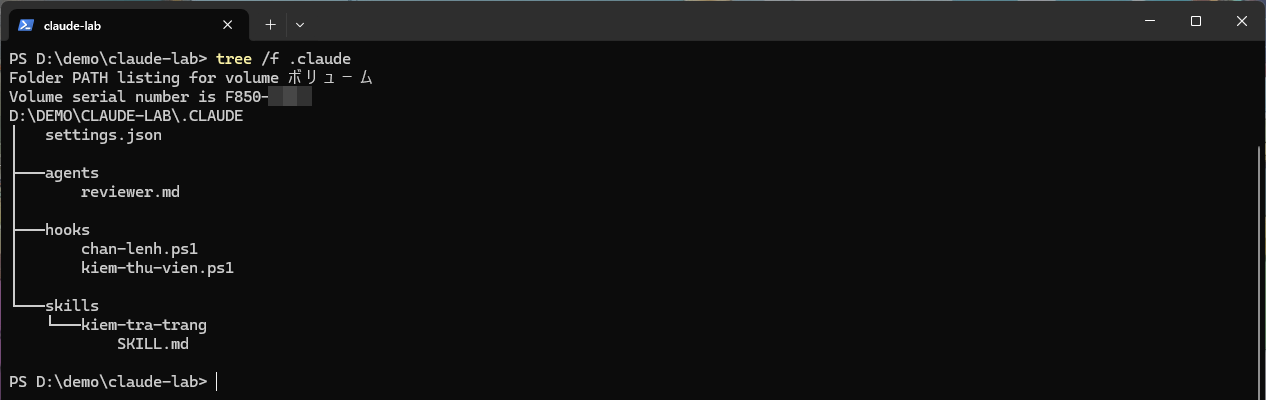 Image 3b. The .claude folder after Step 3
Type claude, then /hooks. The menu reports 2 hooks on 2 events; the two hooks appear under PreToolUse and PostToolUse, with the [Project] label and the matchers Bash|PowerShell, Edit|Write. The menu is view-only; to change a hook, edit settings.json. If you don't see the hooks, check the JSON for a stray comma. Press Esc to close.
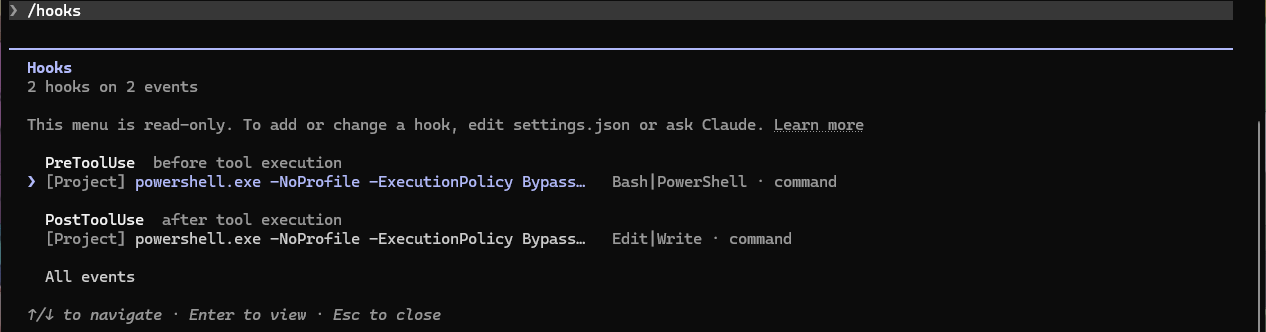 Image 3c. /hooks: the project's two hooks
Step 4: Test the checking hook
Deliberately ask for something against the rules:
Khi lập kỷ lục mới, bắn pháo giấy bằng thư viện canvas-confetti nạp từ CDN jsdelivr.
The request conflicts with CLAUDE.md, so Claude may ask back first. In the test run, Claude offered three choices: write it by hand in plain JS, use canvas-confetti this once, or use it and amend CLAUDE.md. The instruction alone was enough to make Claude pause; choose Dùng canvas-confetti lần này to test the hook.
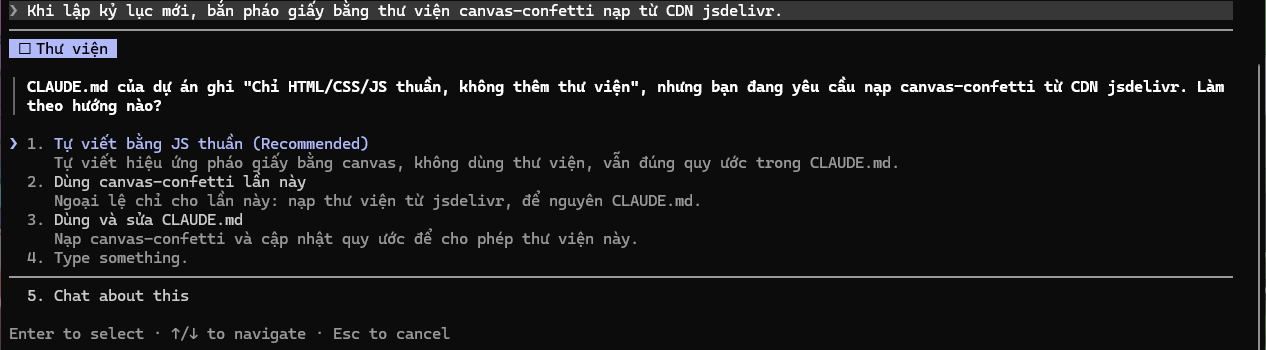 Image 4a. Claude asks back because the request conflicts with CLAUDE.md
Right after the edit that adds the <script src="https://cdn.jsdelivr.net/..."> tag, the terminal shows the red line PostToolUse:Edit hook reported a problem along with the reminder Hook: ... nap file tu ben ngoai; the next edit is still flagged. Note that the file has already been changed; the hook only reports.
At this point Claude can remove the tag itself and write the effect in plain JS, or stop and ask because the request and the rules conflict. In the test run, Claude stopped, said clearly that the file still had the CDN tag, then asked: keep it, remove the library, or change the hook. Either way is fine, as long as Claude doesn't report success while the file still has the CDN tag.
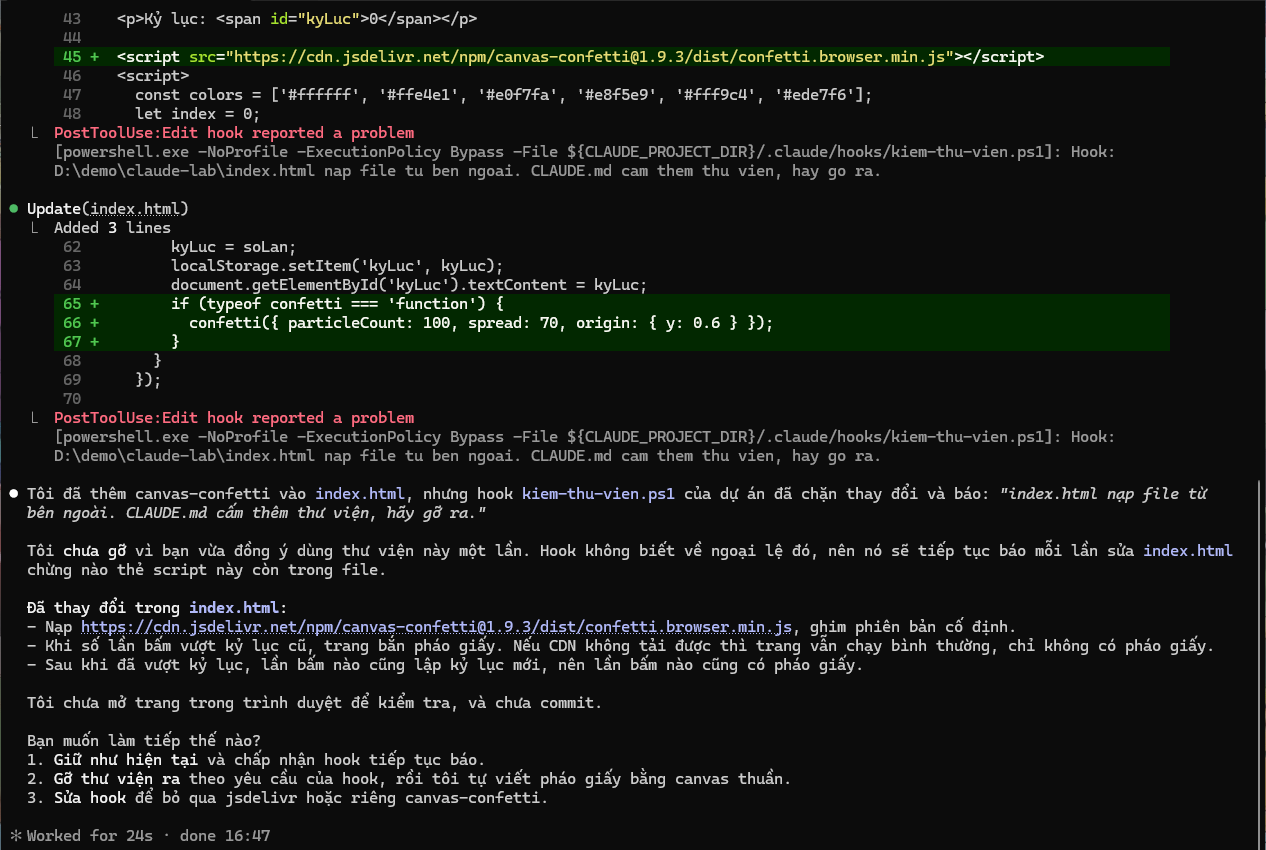 Image 4b. The checking hook reports after each edit, Claude stops to ask
Answer 2 so Claude removes the library and writes the confetti by hand with canvas. Ask again to be sure: index.html còn nạp gì từ ngoài không? Claude searches for src=, href=, http, @import, fetch... and answers that nothing is left. If the Chrome extension isn't connected, Claude will say plainly that it couldn't open the page to see the confetti; open index.html yourself and click until you beat the record.
 Image 4c. CDN removed, nothing loads from outside anymore
Step 5: Let Claude commit
Commit before testing the blocking hook, so that if the hook fails to catch the command, nothing is lost. Type Commit the changes. As in article 3, Claude asks for name, email, message, list of files, then the permission prompt appears. On the test run, the second tab asks which files to commit: all four files, only index.html, or split into two commits. Choose all four, and check that the list includes .claude/hooks/ and settings.json: anyone who clones claude-lab will get the same two hooks. The blocking hook runs before the commit command but does not block, because commit is not on the banned list. If the blocking hook mistakenly blocks the commit command itself because the message mentions the name of a banned command, tell Claude to rewrite the message without mentioning that command.
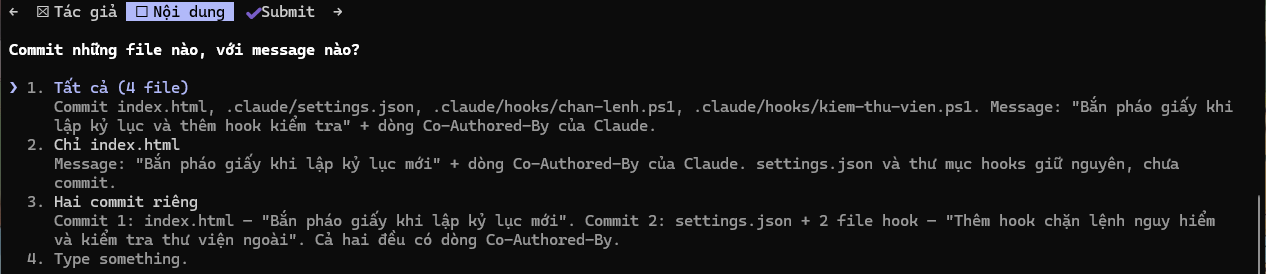 Image 5. Choose to commit all four files, including the two hooks and settings.json
If the repo has been connected to GitHub since article 3, this commit only exists on your machine; to push it up, tell Claude to push, and the ask rule for git push will ask you first.
Step 6: Test the blocking hook
All changes are committed. Tell Claude:
Run git reset --hard.
On the test run, Claude does not run it straight away. When committing in Step 5 it had already read the hook file, so it refuses on its own, explains that this command would not delete anything at this point anyway, and suggests you type ! git reset --hard ... yourself if you really need to. To see the hook at work, type:
Just try running that command to see how the hook blocks it.
The hook runs before the permission check, so whatever the permission mode, even when you issue the command yourself, it still does not run. The terminal shows a red line Error: PreToolUse:Bash hook error: [...chan-lenh.ps1]: Hook chan: ...: Claude receives the reason along with the event name, the tool name and the hook's command. On your machine, the word Bash may be PowerShell, depending on the tool Claude chooses.
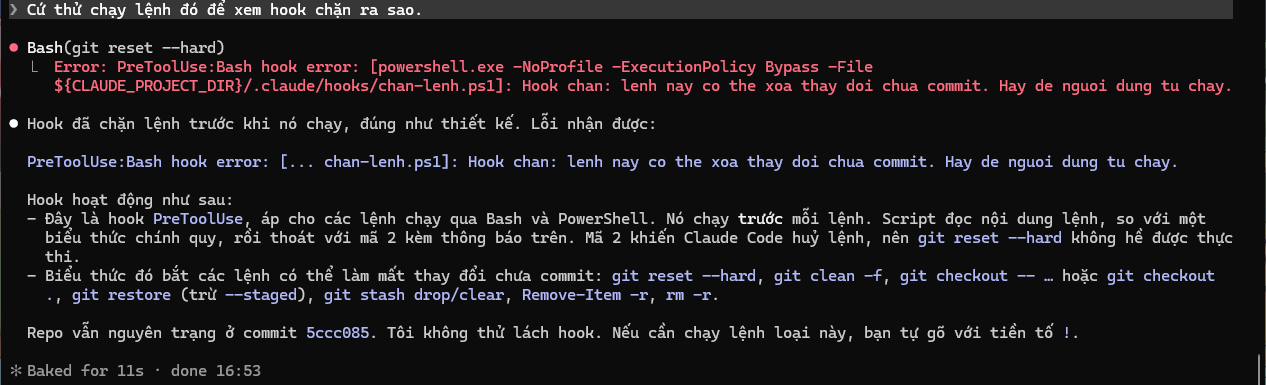 Image 6. The hook blocks git reset --hard before the command runs
When blocked, Claude may look for another way to get the job done. Claude reads the reason the hook sends back, so write the reason as an instruction, here "hay de nguoi dung tu chay". If you really want to discard the changes, type the command yourself in PowerShell; the hook only applies to commands Claude runs.
What hooks cannot do
The blocking hook reads the text of the command, like the ask rule. If Claude writes a script and then runs it, the hook only sees the script's name. If you only need to ban one fixed command, the deny rule in permissions is tidier; hooks are worth using when you need custom logic, such as checking file contents in Step 2. The checking hook watches Edit and Write, so it does not see files modified by shell commands; the documentation suggests adding a Stop hook that scans the whole directory after each turn.
Hooks run with the full rights of your Windows account, so read other people's hooks carefully, including hooks already present in a repo you have just cloned.
In return, hooks place rules somewhere Claude can hardly reach: the script runs before Claude can act, sits in the protected .claude directory, where every change Claude makes must go through a permission prompt or auto mode's classifier, except in bypass-permissions mode. Article 5 uses this same mechanism in reverse: a Stop hook does not let Claude stop while the work is unfinished.
Source: Automate actions with hooks; Hooks reference; Permission modes; Configure permissions; Tools reference; Understanding file encoding in VS Code and PowerShell.
Comments
No comments yet. Be the first!
You need to sign in to comment.