3
Claude Code series, part 5: Connecting Claude to GitHub with MCP and plugins
Hooks only watch shell commands, whereas MCP is another route for Claude to reach GitHub. This post installs the github plugin, issues a narrowly scoped token, sets ask and deny rules for each MCP tool, then has Claude create an issue, open a PR and make changes in response to review feedback. It ends by comparing this with the gh command to show when MCP is worth using.
The hook from bài 4 watches shell commands and file edits. This article opens another path those two hooks do not see: MCP. MCP lets Claude use the tools of an external service; a plugin packages such things into an installable bundle. This article takes GitHub as the real service: Claude creates issues, opens pull requests (PRs), reads review comments and then fixes them. The final section compares it directly with the gh command installed in bài 3, because for GitHub, MCP is not necessarily better.
The article needs the private repo claude-lab from the optional part of Bước 6 in bài 3; if you skipped it, do that part first. The commands in this article are for Windows PowerShell; macOS or Linux users should consult the official documentation for the differences.
Table of contents
- Bước 1: Create a GitHub token with just enough permissions
- Bước 2: Install the github plugin
- Bước 3: Set rules for MCP tools
- Bước 4: Issues and pull requests via MCP
- Bước 5: Read reviews and fix
- MCP or gh
Bước 1: Create a GitHub token with just enough permissions
GitHub's MCP server is run by GitHub itself; according to GitHub's documentation, every account plan can use it, authenticated with a personal access token. The token determines what Claude can do through this server, and that is a limit enforced by GitHub, more reliable than rules in settings.json. It does not restrict the gh command already logged in from bài 3; Bước 3 deals with that.
On GitHub, go to Settings, Developer settings, Personal access tokens, Fine-grained tokens, and choose Generate new token. Give it an easy-to-recognise name such as claude-lab-mcp, with a 30-day expiry. Under Repository access, choose Only select repositories and select only claude-lab.
The Permissions section is easy to overlook: the current interface does not list permissions in advance, but leaves it blank with the line Repositories 0. Click Add permissions, add Issues and Pull requests as Read and write, Contents as Read-only; Metadata is added automatically. On the first trial run, the token was created without any permissions added, and every call to the repo returned 404 Not Found. In that case there is no need to recreate it: click the token, Edit, add the permissions and Update, and the token value stays the same.
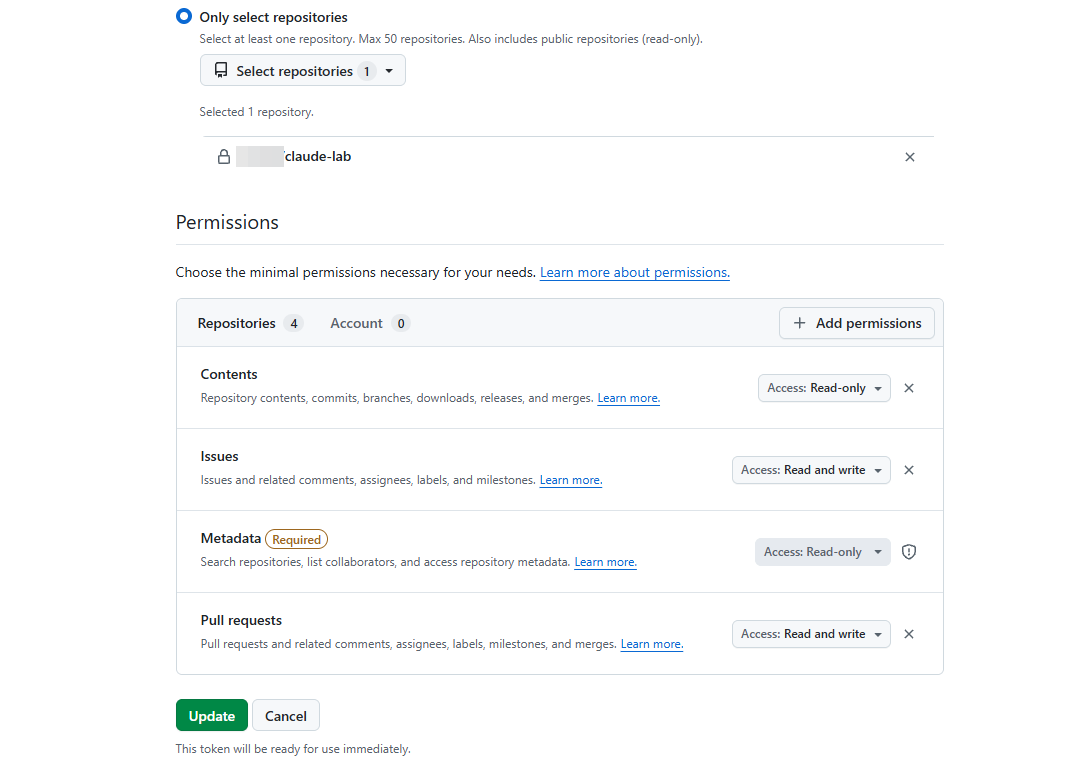 Ảnh 1. Trang Edit token sau khi thêm quyền: chỉ repo claude-lab, bốn quyền
Contents read-only means the token cannot write code or merge PRs; code still goes up to GitHub via git push as in bài 3.
Copy the token, then in PowerShell:
$t = Read-Host 'Dan token'
$t.Length
$ten = 'GITHUB_PERSONAL_ACCESS_TOKEN'
[Environment]::SetEnvironmentVariable($ten, $t, 'User')
Remove-Variable t
At the Dan token: line, paste with the right mouse button; Ctrl+V may not work. $t.Length must return a number around 90 or more. If it returns 0, redo the first line: saving an empty value deletes the variable, and PowerShell reports no error.
Read-Host keeps the token out of the command history. The variable only takes effect in windows opened afterwards: open a new PowerShell window (a new tab may not pick up the variable) and cd D:\demo\claude-lab. Every program running under your Windows account can read this variable, including Claude's shell commands; the token is narrowly scoped and time-limited so that if it leaks, the damage is small. If you suspect a leak, delete the token on the GitHub page where you created it.
Bước 2: Install the github plugin
You can declare the server yourself with claude mcp add, but Anthropic's official marketplace, available from the first time you open Claude Code, already has the github plugin. Apart from the declaration file with its name, this plugin has only one .mcp.json file pointing to GitHub's server, reading the token from the GITHUB_PERSONAL_ACCESS_TOKEN variable. In claude-lab:
claude plugin install github@claude-plugins-official --scope local
claude mcp list
--scope local enables the plugin for you alone, in this folder alone. The line plugin:github:github must show ✔ Connected. If you don't see that mark, check the token again and whether you have reopened the window. If your Claude account is linked to Gmail, Notion or another service on claude.ai, those servers also appear in the list.
 Ảnh 2. Plugin github đã kết nối
The name plugin:github:github shows that the server comes from the plugin; to remove it, remove the plugin in /plugin. The plugin is present in every session of this folder. Thanks to tool search (enabled by default), at the start of a session Claude loads only tool names, with full descriptions loaded when needed; type /context to see for yourself.
Step 3: Set rules for MCP tools
MCP tools take a separate path. The blocking hook from article 4 only watches Bash|PowerShell, and the rule git push * only matches shell commands, so none of those rules sees a call to a GitHub tool. The plugin's tool names take the form mcp__plugin_github_github__<name>. Type notepad .claude\settings.json and replace the whole file with:
{
  "permissions": {
    "ask": [
      "PowerShell(git commit *)", "Bash(git commit *)",
      "PowerShell(git push *)", "Bash(git push *)",
      "PowerShell(gh repo create *)", "Bash(gh repo create *)",
      "PowerShell(gh pr create *)", "Bash(gh pr create *)",
      "PowerShell(gh api *)", "Bash(gh api *)",
      "mcp__plugin_github_github__create_pull_request"
    ],
    "deny": [
      "PowerShell(gh pr merge *)", "Bash(gh pr merge *)",
      "PowerShell(gh repo delete *)", "Bash(gh repo delete *)",
      "mcp__plugin_github_github__merge_pull_request",
      "mcp__plugin_github_github__push_files",
      "mcp__plugin_github_github__create_or_update_file",
      "mcp__plugin_github_github__delete_file"
    ]
  },
  "hooks": {
    "PreToolUse": [
      {
        "matcher": "Bash|PowerShell",

        "hooks": [
          {
            "type": "command",
            "command": "powershell.exe",
            "args": [
              "-NoProfile", "-ExecutionPolicy", "Bypass", "-File",
              "${CLAUDE_PROJECT_DIR}/.claude/hooks/chan-lenh.ps1"
            ],
            "onFailure": "block"
          }
        ]
      }
    ],
    "PostToolUse": [
      {
        "matcher": "Edit|Write",

        "hooks": [
          {
            "type": "command",
            "command": "powershell.exe",
            "args": [
              "-NoProfile", "-ExecutionPolicy", "Bypass", "-File",
              "${CLAUDE_PROJECT_DIR}/.claude/hooks/kiem-thu-vien.ps1"
            ]
          }
        ]
      }
    ]
  }
}
The hooks block stays as it was in article 4, with only the args section broken across lines for readability. The ask block contains all the rules from article 3, plus opening PRs and the gh api command. The deny block removes outright the MCP tools for merging, writing code and deleting files, and blocks gh pr merge and gh repo delete when Claude types them in the usual way. The gh api command can still write to GitHub, so it must go through the prompt. GitHub's server currently has no repo-deletion tool, so no rule is needed for that. Rules for gh are necessary: the gh login from article 3 carries the broad permissions of your account and is not limited by the new token.
Once saved, type Get-Content .claude\settings.json -Raw | ConvertFrom-Json: an error means the JSON is broken, and in that case no rules are loaded. If you go into claude and see a settings error, fix it straight away.
Step 4: Issues and pull requests via MCP
Type claude and send:
Use the GitHub MCP tool to create an issue in the claude-lab repo:
"Add a Copy record button: clicking it copies the line 'Record: N' to the clipboard".
Then create a new branch, do that issue, commit, push the branch and open a PR
into the main branch with "Closes #<issue number>".
The phrase "Use the GitHub MCP tool" is deliberate: without saying so, Claude might pick `gh` because it is already on the machine.
If the confetti commit from article 4 has not been pushed, Claude may stop and ask first: whether to include that commit in the PR, or push the main branch first. In the trial run, it asked exactly this. Answer by pushing the main branch first so the PR contains only the new button; the permission prompt for `git push` appears, choose Yes.
Creating an issue has no ask rule, so in auto mode it runs straight away. In the trial run, Claude finished the button and then opened Chrome through a temporary server to click it, after which it asked per CLAUDE.md with a box having two tabs, `Commit` and `Push`. Commit and push are combined in one command, so only one permission prompt appears. The last box is the open-PR box, naming the tool and the PR content about to be created:
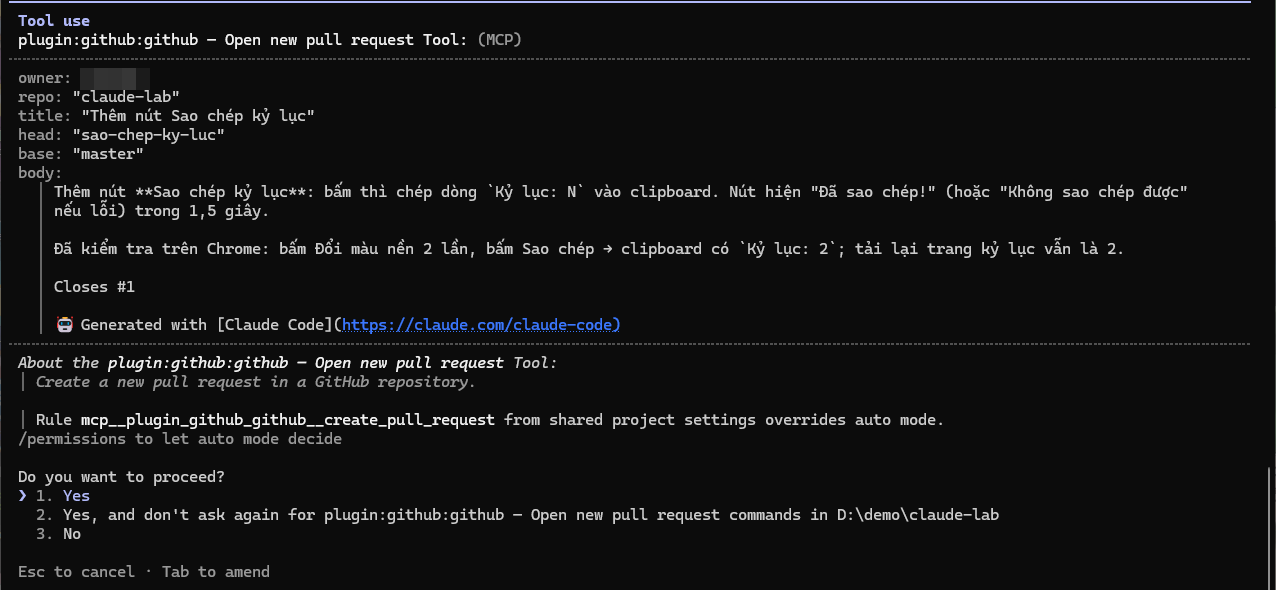
*Image 3. The ask rule blocks create_pull_request in order to ask*
Choose `1. Yes`. Do not choose item 2: it allows this tool without asking again in the folder.
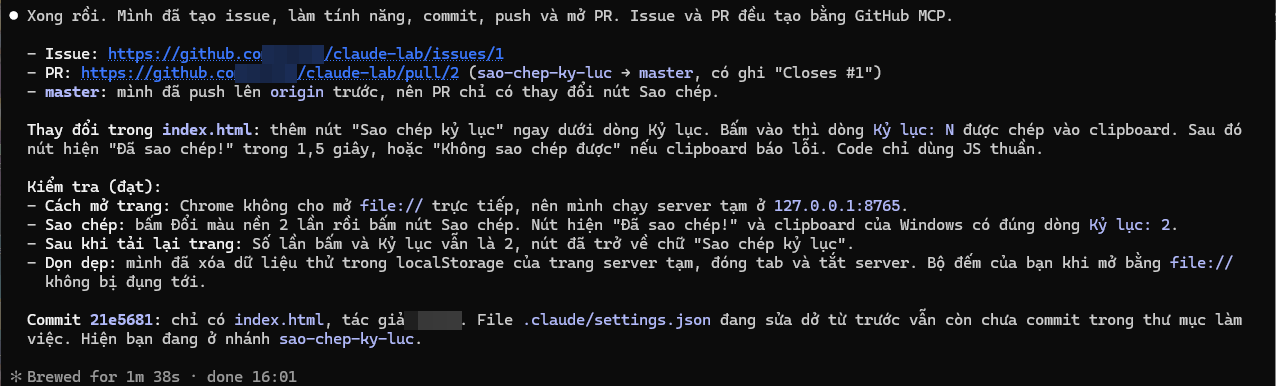
*Image 4. Both the issue and the PR were created with GitHub MCP*
Issues and PRs share the same number sequence, so the first issue is #1 and the PR is #2. Open the repo on GitHub to see both.
## Step 5: Read the review and fix
On the PR page, Files changed tab, click the plus sign next to a line in `index.html`, write a comment, for example "After copying, change the button text to Copied for 2 seconds", then choose Add single comment. If you choose Start a review, remember to click Submit review, otherwise the comment stays in a pending state. Then go back to the session:
Read the review comments on the PR just opened, fix accordingly, commit and push to the same branch.
Claude reads line-attached comments through the `pull_request_read` tool; in the trial run, it called three times to get the review, the line comments and the general comments.
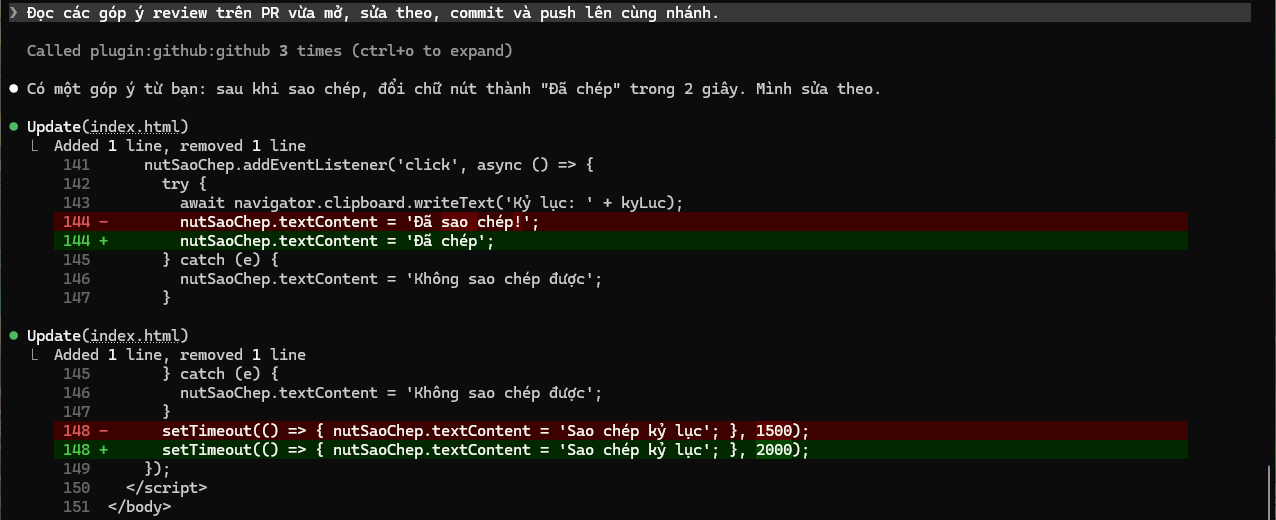
*Image 5. Claude reads the comments through MCP and fixes exactly two places*
Claude again asks about the commit per CLAUDE.md; commit and push are still combined in one command so there is only one permission prompt, choose `1. Yes`. This time Claude does not open the browser to check again and says so plainly, so open the page yourself and click through.
If the PR is fine, you merge it yourself on GitHub: the MCP token has no merge permission, `gh pr merge` is blocked, `gh api` has to ask you; putting code into the main branch should be a human decision. The `.claude\settings.json` from Step 3 is still uncommitted, because Claude only put `index.html` into the two commits; article 6 will continue editing this file.
## MCP or gh
Everything above can be done with `gh` already logged in from article 3: `gh issue create`, `gh pr create`, `gh api`. With GitHub, `gh` is usually more compact: no extra token in environment variables, no extra server, permission rules match by command word like any shell command. The weak point: `gh pr view --comments` does not show comments attached to code lines, Claude has to call `gh api` as well, whereas MCP returns them ready-made.
MCP is worth it when a service has no good command-line tool, such as Notion or Figma, or when using Claude somewhere without a shell. A plugin is worth it when you need to package several things: the set of skills, subagents and hooks from articles 3 and 4 is in fact an unpackaged plugin, and once gathered, a new project needs only one install command.
There is one gap: hooks and rules only see what Claude does, not the text Claude reads in. Issues and comments written by others go straight into the context. If it is a private repo only you write in, no worries; with a public repo, a strange issue could contain instructions aimed at Claude, so read first whatever you tell Claude to read. Article 6 has Claude run many rounds unsupervised, so these layers of protection are all the more necessary.
Source: Connect Claude Code to tools via MCP; Plugins overview; Install and manage plugins; Configure permissions; GitHub plugin in the official marketplace; Set up the GitHub MCP server; GitHub MCP Server; gh pr view.
Comments
No comments yet. Be the first!
You need to sign in to comment.