2
Claude Code series, article 6: Ralph Loop, letting Claude work through multiple rounds on a separate branch
Ralph Loop runs the same prompt for multiple rounds, each round being a new Claude session. The article writes a PowerShell loop with brakes: a separate branch, a test directory lock, a cost ceiling, stopping when node --test goes green, ending with a PR. The trial run went green after 7 rounds, but the interface portion still had to be done by hand.
Article 5 ended with a reminder that when Claude runs multiple rounds unattended, the guardrails become all the more necessary. This article does that. The technique is called Ralph Loop, described by Geoffrey Huntley in a July 2025 article, summed up in a single line: while :; do cat PROMPT.md | claude-code ; done. The same prompt is pumped in over and over. Each round is a new session with a blank context, and the only thing linking the rounds is the file on disk.
This article runs a Ralph Loop with brakes in claude-lab: a maximum number of rounds, a cost ceiling per round, a stopping criterion decided by tests, running on a separate branch and ending with a PR for you to review. The repo is private on GitHub and gh has been set up since article 5. The commands in this article are for Windows PowerShell; macOS or Linux users should consult the official documentation for the differences.
Table of contents
- Step 1: Back up and branch off
- Step 2: Let Claude interview you, write the spec and tests
- Step 3: Lock the test directory
- Step 4: Write PROMPT.md and the loop
- Step 5: Run and monitor
- Step 6: Finish the interface and open the PR
- /goal and the ralph-loop plugin
Step 1: Back up and branch off
The loop runs unattended, so first of all there must be a way back. Type claude and send:
Push the main branch to GitHub as a backup.
Then create the branch ralph/thu-thach-10-giay from the main branch and switch to it.
If the main branch has unpushed commits, the permission prompt appears before the push, as in article 3. In the test run, the main branch had already been fully pushed since article 5. Claude compared with GitHub, saw they matched, so skipped the push, asked nothing, and only created the new branch. It also noted that the Copy button from article 5 is not on this branch because PR #2 has not been merged. Uncommitted changes in .claude\settings.json carried over to the new branch.
From here, the loop in Step 4 only runs on the ralph/... branch and stops after any round in which Claude leaves the branch.
The tests in this article run on Node.js. If you do not have it, exit Claude and install it: winget install --id OpenJS.NodeJS.LTS, then open a new PowerShell window.
Step 2: Let Claude interview you, write the spec and tests
Ralph is only as good as its stopping criterion. If the criterion is vague, the loop either runs forever or stops early because Claude decides it is done. Send next:
I want to add a "10-second challenge" mode to the page: press Start,
count the number of presses in 10 seconds, save a separate challenge record.
Interview me until you have enough to write the spec, then write SPEC.md.
Do not write code yet.
In the test run, Claude asked in 3 rounds, each a box with 4 tabs, 12 multiple-choice questions in total. The first round asked which button to use for pressing, whether the old counter is kept separate, how a new record is announced and what appears on screen. The next two rounds asked whether the timer shows decimals or whole numbers, whether other buttons are locked during a round, and what happens if the page is reloaded mid-round. Each question has one option marked (Recommended). Choose with the arrow keys and Enter, press Tab to move to the next question.
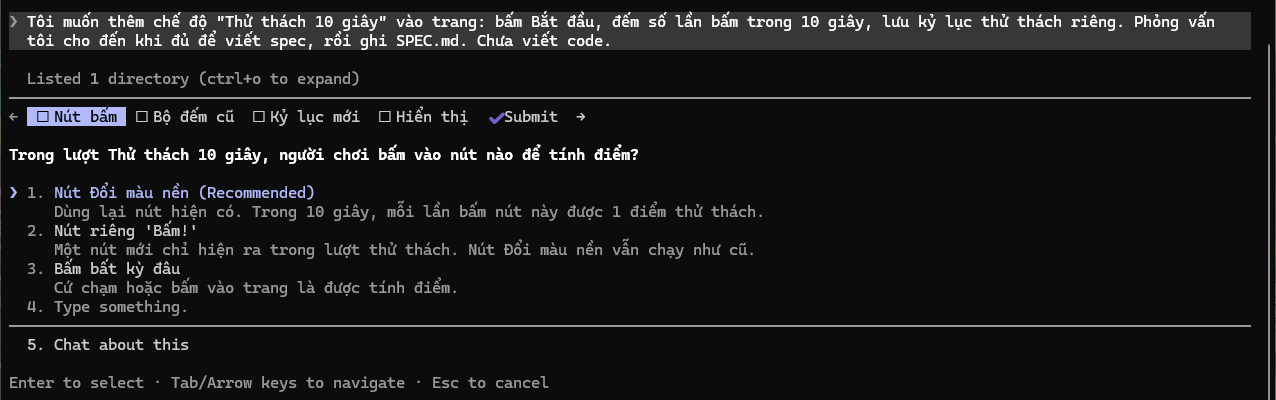 Image 1. The interview box for round 1, four question tabs at the top
Once you have answered, Claude writes SPEC.md, about 60 lines, with an acceptance criteria section. Any detail it chose itself without asking, it states clearly so you can correct it. Send next:
From SPEC.md: split the challenge logic into a file thu-thach.js usable
both in Node and when opening index.html directly (no ES modules).
Write tests for that logic in the test directory using node:test, do not write code yet.
Write PLAN.md: a task list marked [ ], and an empty Log section.
Run node --test to see the tests fail.
In the test run, Claude wrote 16 tests in test\thu-thach.test.js. The functions receive the timestamp from outside, so the tests do not have to wait 10 real seconds. PLAN.md has 13 tasks: logic first, index.html after, and finally a check in the browser. node --test reports red with a MODULE_NOT_FOUND error because thu-thach.js does not exist yet.
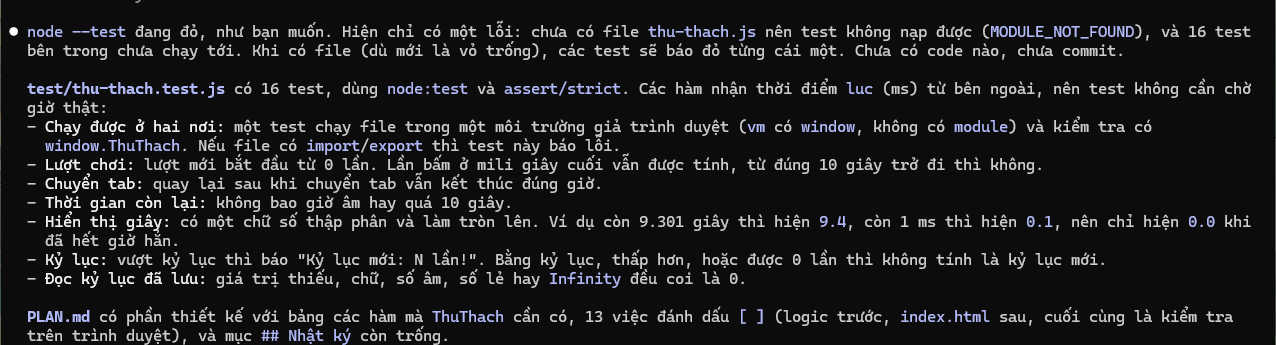 Image 2. Tests red because thu-thach.js does not exist yet, with a PLAN.md summary
Read the tests carefully. This is the contract: the loop will run until they go green, so any case the tests miss is a case the result will miss too. Once you are happy, tell Claude to commit, including the .claude\settings.json from article 5. Claude asks again for the committer name and message per CLAUDE.md, then the permission prompt for git commit appears.
Step 3: Lock the test directory
The cheapest way to make tests green is to edit the tests. Exit Claude, open notepad .claude\settings.json, and add a line at the top of the deny list from article 5 (the trailing comma is mandatory):
"Edit(/test/**)",
Save and validate the JSON as in article 5: Get-Content .claude\settings.json -Raw | ConvertFrom-Json.
The leading / means relative to the project root. The Edit rule applies to every file-editing tool Claude has. According to the documentation, for Bash commands it also covers some ways of writing files such as > or tee. The documentation does not promise the same for PowerShell, and no rule stops a Node script from writing files itself. So the loop in the next step also checks with git.
Step 4: Write PROMPT.md and the loop
notepad PROMPT.md, paste:
Đọc SPEC.md và PLAN.md.
Chọn MỘT việc chưa xong quan trọng nhất trong PLAN.md và chỉ làm việc đó.
Chạy node --test. Việc nào có test liên quan đã xanh thì đánh dấu [x].
Ghi một dòng vào mục Nhật ký của PLAN.md: đã làm gì, còn vướng gì.
Không sửa thư mục test. Không commit.
"One task per loop" is the advice Huntley repeats most: the next loop remembers nothing from the previous one, so the work has to be recorded in PLAN.md. Next, notepad ralph.ps1:
param([int]$SoVong = 8, [string]$NganSach = '1')
[Console]::OutputEncoding = [System.Text.Encoding]::UTF8
$nhanh = git branch --show-current
if ($nhanh -notlike 'ralph/*') {
  Write-Host 'Chua o nhanh ralph. Dung.'; exit 1
}
$thamSo = @(
  '-p', 'Doc PROMPT.md trong thu muc nay va lam dung theo do.',
  '--permission-mode', 'auto',
  '--permission-prompts', 'none',
  '--max-budget-usd', $NganSach,
  '--disallowedTools', 'mcp__*', 'PowerShell(gh *)', 'Bash(gh *)',
  '--output-format', 'json'
)
$tong = 0
for ($i = 1; $i -le $SoVong; $i++) {
  Write-Host "--- Vong $i ---"
  $kq = claude @thamSo | ConvertFrom-Json

  $tong += $kq.total_cost_usd
  if ((git branch --show-current) -ne $nhanh) {
    Write-Host 'Claude doi nhanh. Dung.'; break
  }
  if (git status --porcelain -- test) {
    Write-Host 'Thu muc test bi sua. Dung.'; break
  }
  node --test
  if ($LASTEXITCODE -eq 0) { Write-Host "Test xanh sau $i vong."; break }
}
Write-Host ("Tong chi phi uoc tinh: {0:N2} USD" -f $tong)
The script is written without diacritics for the reason given in article 4: Windows PowerShell 5.1 misreads UTF-8 files without a BOM. The claude arguments are collected into the $thamSo array and passed with @thamSo for readability. Each claude -p is a new session, loading CLAUDE.md, skills and hooks as usual.
--permission-prompts none means that anything requiring a question to you is refused, including commit and push because of the ask rule. --disallowedTools removes all MCP tools outright and blocks gh commands typed the usual way, so the loop cannot reach GitHub through those two routes. The blocking hook from article 4 still guards commands that delete changes, and the script stops if Claude switches branch or touches the tests.
Step 5: Run and monitor
Still in claude-lab, in a PowerShell window (not inside Claude):
powershell -NoProfile -ExecutionPolicy Bypass -File .\ralph.ps1
Each round prints the entire node --test output, with plenty of red lines, so reading the Log section in PLAN.md is easier to follow. Press Ctrl+C to stop at any time.
In the trial run, each round took under a minute and did exactly one thing. The number of green tests climbed steadily: 0, 4, 5, 8, 10, 14, then 16. By round 7 it reached a full 16/16 and the script stopped. No round touched the test directory or switched branches.
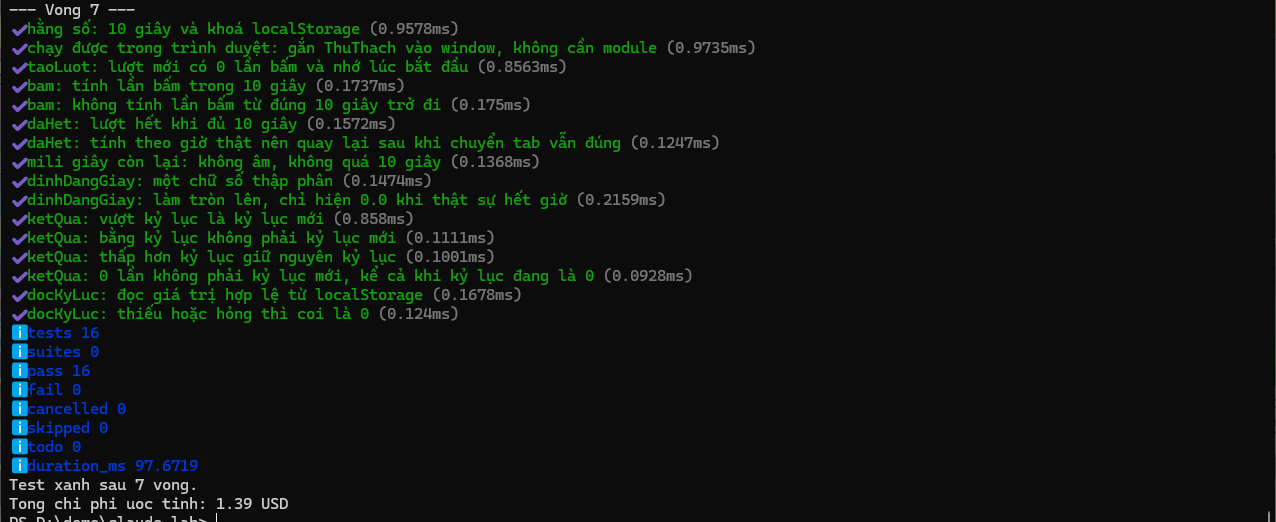 Image 3. Round 7: 16 green tests, the script stops and prints the total cost
The total cost is an estimate on your machine, summed from the total_cost_usd field of each round. The trial run came to USD 1.39 for 7 rounds. The figure may differ from your bill, and the per-round cap is a soft cap: the documentation says spending can exceed it. With a Pro or Max plan this figure is not a bill, but usage still counts against your plan's limits.
If the tests are still not green after 8 rounds, don't raise the round count straight away. Read the Log section in PLAN.md: usually a test contradicts the spec, or one task is too big for a single round.
Step 6: Finish the interface and open a PR
Green tests don't mean you're done. In the trial run, the loop stopped with 5 tasks still undone in PLAN.md: 4 tasks editing index.html and the browser check. The script only knows how to ask node --test, and the tests only cover the logic. The loop goes as far as the stopping criterion measures.
The interface needs human eyes, so do it in a normal session. Type claude and send:
The loop has finished the logic, tests are green.
Finish the remaining index.html tasks marked [ ] in PLAN.md,
mark them [x] and write the Log. Don't touch the test directory.
In the trial run, Claude took about three and a half minutes. It checked the page itself with the kiem-tra-trang skill from article 3, reported all 9 criteria in SPEC.md passing, and said plainly that it hadn't tried switching tabs for real. Open index.html in your browser yourself and click through: press Bắt đầu, then press Đổi màu nền a few times before the 10 seconds are up. In the trial run I pressed it 5 times.
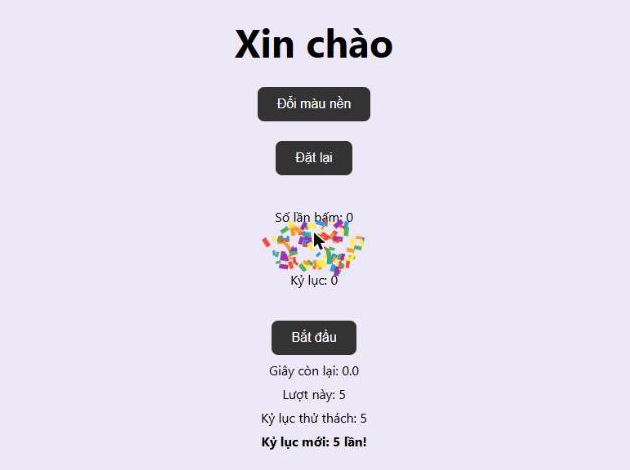 Image 4. Time's up: new record of 5 presses, confetti, the old press count is still 0
Once you're happy, send:
Summarise the changes on this branch against the main branch.
Commit everything, including PROMPT.md and ralph.ps1.
Then push the branch and open a PR into the main branch with gh,
with the PR description noting the round count and cost: 7 rounds, USD 1.39.
Claude lists the committer, files, message and PR content, then waits for you to reply "agree". After that there are two permission boxes: one for git commit, one for the push command. In the trial run, Claude combined the push and gh pr create into a single command, so the second box asked for both. Read the PR description in the box carefully before choosing 1. Yes.
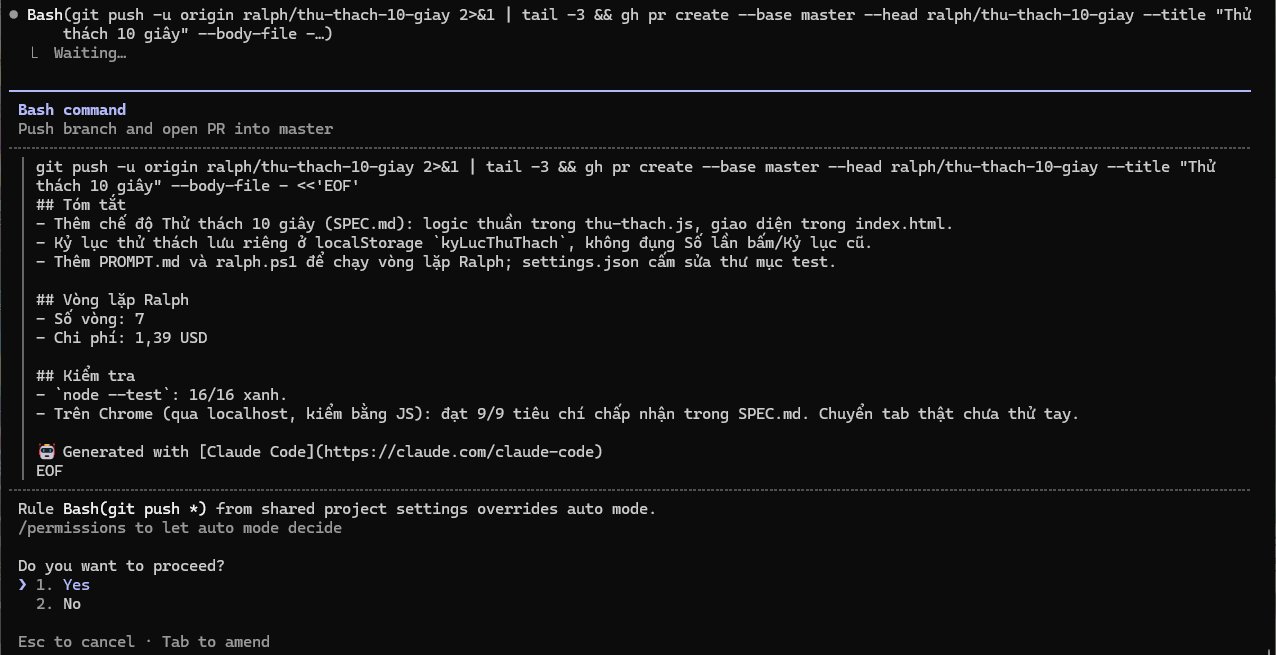 Image 5. One permission box for both push and gh pr create
In the trial run, the PR was #3; Claude did not merge. Review the diff on GitHub as in article 5. If you don't like it, close the PR: the main branch takes no commits from the loop.
/goal and the ralph-loop plugin
According to the documentation, Claude Code has /goal built in. Type /goal node --test has no errors and the test directory is unchanged, or stop after 15 turns, and Claude keeps working turn by turn within the same session, while a small model reads the conversation to judge whether it's done. Type /goal with nothing after it to see the turn count and tokens spent. This way needs no script, but context piles up across turns, and the judge only reads text, it doesn't run the tests itself.
The ralph-loop plugin in the official marketplace also loops within the same session, via a Stop hook. That hook is a bash script: on Windows it needs Git Bash, and the script also calls jq, a tool that usually isn't installed. In both approaches, right or wrong is still judged by the model. The hand-written loop in this article leaves the judging to node --test, and that's why it's worth writing yourself even though it's longer.
But node --test can only grade what has tests. The interface work in Step 6 still has to be checked by Claude itself and then clicked through by you, and "passing 9/9 criteria" is Claude's own report. Article 7 measures how well Claude actually performs with eval: a fixed set of prompts, fixed grading, run repeatedly.
Source: Geoffrey Huntley, Ralph Wiggum as a software engineer; Run Claude Code programmatically; CLI reference; Keep Claude working toward a goal; Best practices; Configure permissions; Manage costs; Plugin ralph-loop; Node.js test runner.
Comments
No comments yet. Be the first!
You need to sign in to comment.