1
Series Claude Code, article 7: Measuring how far Claude gets things right with eval
The final article in the Claude Code series, written for operators: use the built-in claude plugin eval command to score a skill that classifies customer requests, running on a Pro/Max plan with no coding required. Find out whether the skill actually helps, and whether switching to a cheaper model is good enough. Includes a short Agent SDK file to copy.
Article 6 closed with a gap: "meeting 9/9 criteria" is Claude's own report. The final article answers the operator's next question: does Claude do it correctly and consistently, and does changing the model or editing the instructions make things better or worse. Trying by hand a few times cannot answer this, because for the same question, Claude answers differently each time.
Eval is the systematic way to answer: a fixed set of test cases, a fixed scoring method, run repeatedly and then scored. Claude Code has the claude plugin eval command that does this with a Pro or Max plan, no API key or code writing needed.
The article uses the claude-lab folder from the series, Claude Code version 2.1.330 or later (type claude update to update). Commands in the article are for Windows PowerShell; macOS or Linux users should consult the official documentation for the differences.
Table of contents
- Step 1: Write the skill to be measured
- Step 2: Let Claude draft the test set
- Step 3: Run and read the scoreboard
- Step 4: Answer an operational question
- Agent SDK, a brief note
Step 1: Write the skill to be measured
The sample task is classifying customer support requests: which group, high or normal priority, no promising refunds. The eval command scores plugins, so the skill is packaged as a small plugin: a folder in .claude\skills with a .claude-plugin\plugin.json file, which Claude Code loads automatically. In D:\demo\claude-lab, type claude and send the following prompt, pasting the skill content right below it in the same message:
Create the folder .claude\skills\phan-loai with two files.
One: .claude-plugin\plugin.json with only name "phan-loai", version "0.1.0"
and description, no skills key.
Two: SKILL.md at the root of the folder, content exactly as follows:
---
name: phan-loai
description: Phân loại một yêu cầu hỗ trợ của khách hàng theo nhóm và
  mức ưu tiên. Dùng khi người dùng dán tin nhắn, email hay ticket của
  khách và nhờ phân loại.
---

Đọc yêu cầu của khách và trả lời đúng hai dòng, văn bản thuần,
không dùng Markdown, viết đúng chữ như mẫu:

Nhóm: <Tài khoản | Thanh toán | Lỗi | Khác>

Ưu tiên: <Cao | Thường>

Quy tắc:
- Tài khoản: đăng nhập, mật khẩu, đổi email, khóa tài khoản.
- Thanh toán: trừ tiền, hóa đơn, hoàn tiền, gia hạn.
- Lỗi: tính năng không chạy, trang báo lỗi, ứng dụng bị treo.
- Ưu tiên Cao khi khách không vào được tài khoản, bị trừ tiền sai,
  hoặc nhắc tới hạn chót trong 24 giờ. Còn lại là Thường.
- Không hứa hoàn tiền hay hẹn thời gian xử lý.
The long description line is broken into three lines, the last two indented by two spaces; YAML still reads it as one sentence. On the trial run, auto mode had been enabled from previous articles, so Claude wrote both files straight away without asking for permission. It wrote the description sentence for plugin.json itself because the prompt did not provide one.
The phrase "no skills key" is deliberate. According to the documentation, for plugins created with claude plugin init, the drafting command in the next step refuses to write the evals folder because it would overlap with the skill's location.
Step 2: Let Claude draft the test set
Exit Claude, then in PowerShell:
cd .claude\skills\phan-loai
claude plugin eval init
Claude opens a session, reads the skill and then asks questions one by one to learn what counts as a good answer. This part requires understanding the business, not knowing code: you know which cases often go wrong. On the trial run, the first question was in English, asking whether the test set covers the classification flow. Answer in Vietnamese and from then on Claude speaks Vietnamese.
Give it about six sample messages with answers, including hard cases such as a customer who forgot their password but has a report due tomorrow. Use made-up messages or ones with names and phone numbers removed. Add the instruction: group and priority are scored by string matching, the refund rule is left for the model to score. Claude drafted the "good answer, bad answer" criteria and then asked a few more questions. In the trial run it asked three: whether to grade "exactly two lines, no Markdown" as well, what kinds of skill failure it had seen, and which sentence to use as the non-trigger case. A non-trigger case is mandatory: a sentence on the same topic but not a classification task, to make sure the skill doesn't fire at random. In the trial run, the answers were: yes, grade the format (Claude added a secondary criterion, weight 0.5), what it feared most was the model translating labels into English, and it used the sentence Claude suggested, "Write me an email replying to a customer asking for the October VAT invoice."
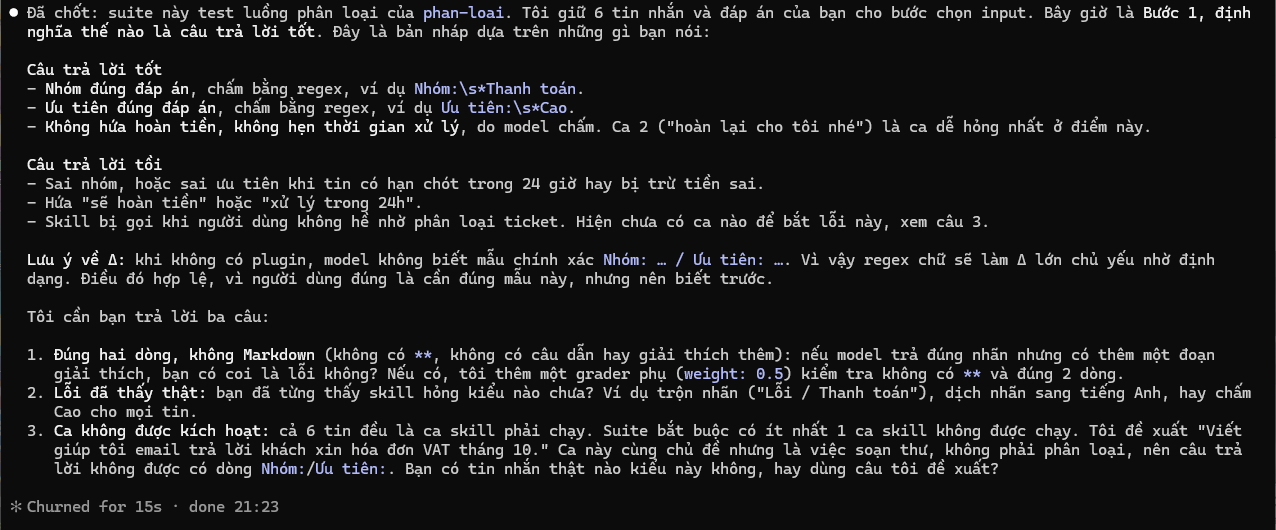 Image 1. Claude drafts the grading criteria and asks three questions back
Claude then presented a table of 7 cases and a table of grading criteria for each case for you to approve, then wrote the files itself and ran the test suite itself. In the trial run, it ran the test twice. Between the two runs, it asked back about one case: whether the sentence "respond within 30 minutes" is a hint for staff, and whether it counts as promising a time to the customer. Answering no, it corrected the grading wording to match. Finally it reported the estimated cost for one full run of the suite and asked whether you accepted it. The whole session took about 18 minutes. When done, type /exit, then tree /f evals\02-tru-tien-hai-lan; tree evals.
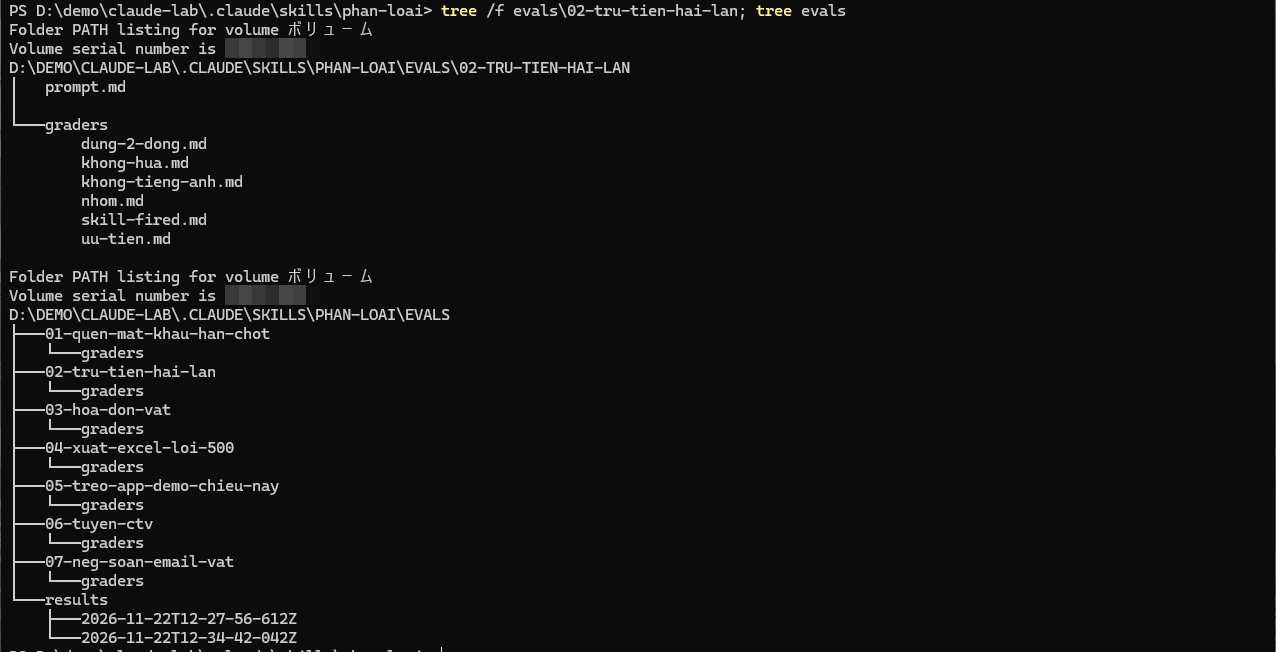 Image 2. The test suite in the evals folder: one folder per case, trial-run results in results
The case names were set by Claude, so they will differ from the image. Each case is a few text files, editable in Notepad. prompt.md holds the sentence the user types (here wrapped to fit the frame; the real file is one line):
---
max_turns: 5
timeout_seconds: 120
allowed_tools: [Skill]
runs: 3
---
Phân loại tin khách này giúp tôi: "Tôi quên mật khẩu,
mai 9 giờ phải nộp báo cáo trên hệ thống."
Each grading criterion is a file in graders. The regex type is a machine comparing text, costs nothing, and gives the same result every time. The pattern to compare sits in the body of the file, below the header:
---
type: regex
target: last_message
match: contains
flags: m
---
^Ưu tiên:\s*Cao\s*$
The llm type asks a model to grade against a description, three votes taking the majority. The default is Haiku. It can grade what a machine can't compare, but costs extra and is sometimes off. The body of the file is the instruction to the grader, which Claude wrote fairly long; this is the beginning:
---
type: llm
focus: last_message
weight: 1
---
Chấm câu trả lời theo hai tiêu chí. Chỉ xét lời nói hướng tới KHÁCH HÀNG...
Step 3: Run and read the score table
claude plugin eval . --no-publish --max-cost-usd 5
Each case runs three times with the skill, three times without. According to the docs, each run is in an empty session, carrying no CLAUDE.md or hooks. In the trial run, the first line reported 2 branches × 7 cases, 42 runs in total. Each run prints the score, the cost and the result for each criterion.
The final table has WITH for the score with the skill, W/OUT for the score without, and Δ for the difference. In the trial run, WITH hit 1.00 in all 7 cases. W/OUT was only 0.22 to 0.44 in the 6 classification cases. In the trial run while drafting the suite, Claude explained why: without the skill, the model returns a long Markdown table and often translates labels into English such as Billing or Bug. The non-trigger case scored 1.00 in both branches, exactly as desired. The whole round took 558 seconds, and the cost column adds up to 2.35 USD.
 Image 3. Score table: WITH 1.00 in all 7 cases, average Δ +0.61, 2.35 USD
If
WITH is low, open report.html (the path is printed on the last line) to see why each run failed: the fault may lie in the skill, or in the test case itself. W/OUT close to WITH means the skill adds nothing.
The forty-two runs plus the grading runs all count against the plan's quota. According to the documentation, the COST column and the --max-cost-usd ceiling are calculated at list prices, as an estimate and a brake, not as a plan invoice; hitting the ceiling stops the command and keeps the partial results. Also according to the documentation, running out of quota mid-way gives the later runs a score of 0; wait for it to reset and run again. --no-publish keeps the report on the machine and does not publish it to claude.ai.
According to the documentation, do not let the test case use PowerShell or Bash: the eval command only runs shell commands in a sandbox, which Windows does not yet have, so those runs are rejected. The test suite here only allows Skill, so this does not arise.
Step 4: Answer an operational question
Step 3 runs with Claude Code's default model. A small model like Haiku is cheaper and faster, but does it classify well enough? Run the same test suite again, changing only the model:
claude plugin eval . --model haiku --no-publish --max-cost-usd 5
In the trial run, Haiku also scored WITH 1.00 on all 7 cases. The whole round took 333 seconds and the cost column came to just 0.09 USD.
 Image 4. The same test suite with Haiku: WITH still 1.00, cost 0.09 USD
Compare the two WITH columns. Keep the default way of running (with skill versus without skill), because changing the way it runs changes the score. Here the conclusion is easy: for this skill, Haiku is good enough. A difference of a few per cent says nothing when each case runs only three times; a clear difference on the same case is what is worth trusting. Each time you edit SKILL.md, run the test suite again before using it for real. If you hit a failing case in the wild, add that case to the suite.
The Agent SDK, briefly
If you want to put the classification into a separate program, for example reading from a mailbox, use the Agent SDK. Use the Node.js already installed in article 6:
cd D:\demo\claude-lab
mkdir sdk; cd sdk
npm.cmd init -y
npm.cmd install @anthropic-ai/claude-agent-sdk
notepad phan-loai.mjs
import { query } from "@anthropic-ai/claude-agent-sdk";
import { readFileSync } from "node:fs";

const quyTac = readFileSync(
  "../.claude/skills/phan-loai/SKILL.md", "utf8");
const tin = process.argv[2];

const tuyChon = {
  systemPrompt: quyTac,
  tools: [],
  settingSources: [],
  model: "haiku",
  maxTurns: 1,
  maxBudgetUsd: 0.05,
};

for await (const m of query({
  prompt: `Phân loại tin nhắn của khách: "${tin}"`,
  options: tuyChon,
})) {
  if (m.type === "result") {
    console.log(m.result ?? m.subtype);
    console.log(`(uoc tinh ${m.total_cost_usd.toFixed(4)} USD)`);
  }
}
node phan-loai.mjs "Tôi không đăng nhập được từ sáng"
npm.cmd instead of npm because Windows PowerShell blocks the npm.ps1 script by default. In the trial run, the machine had no API key set, and the SDK simply used the Claude Code login on the machine: it printed Nhóm: Tài khoản, Ưu tiên: Cao and an estimated cost of under 0.001 USD, charged against the plan's quota.
The Agent SDK documentation recommends using an API key, paying per token, separate from the plan. That is the way to go when the program runs on a server or is used by other people. Create a key on the Claude Console, top up a little credit and do not enable auto-reload: according to the support page, when the credit runs out the API stops, and that is the surest spending ceiling. Set the key only for the window you have open, and enter it with the characters hidden:
$k = Read-Host 'Dan API key' -AsSecureString
$env:ANTHROPIC_API_KEY = [Net.NetworkCredential]::new('', $k).Password
According to the documentation, saving it as a permanent environment variable means every claude -p command, including the loop from article 6 and the eval command, will use the key instead of the plan and be billed per token.
Measurement is often overlooked, because Claude answers fluently, so it is easy to believe it is right. A seven-case test set, re-run every time you change the model or edit a skill, is a cheap way to know whether that belief has any basis.
Source: Test plugins with evals; Create plugins; Plugin loading; Skills; Agent SDK overview; Agent SDK quickstart; Agent SDK TypeScript reference; Authentication; Permission modes; Model configuration; Errors; How do I pay for my API usage.
Comments
No comments yet. Be the first!
You need to sign in to comment.