4
Claude Code series, part 3: Clearing context with skills and subagents
When the context fills up, Claude performs worse. This guide covers clearing context with /compact and /clear, writing skills that Claude loads on demand, and using subagents for review. You will let Claude commit on its own but make it ask first, then push the code to a private GitHub repository.
Article 2 promised to discuss the session's context. This article measures it with /context, turns a section of CLAUDE.md into a skill, creates a read-only subagent for review, then uses both for a small feature. The article continues in the claude-lab folder.
Note: from this article onwards, Claude checks changes, commits and (if you want) pushes to GitHub for you. Step 2 sets a rule requiring Claude to ask before committing or pushing, even in auto mode.
Commands in the article are for Windows PowerShell; macOS or Linux users should consult the official documentation for the differences.
Table of contents
- Step 1: Measure context before tidying up
- Step 2: Move the checking process into a skill, set commit and push rules
- Step 3: Create a read-only reviewer subagent
- Step 4: One session writes, one subagent reviews
- Step 5: /compact or /clear
- Step 6: Let Claude commit and push to GitHub
- When it's worth doing
Step 1: Measure context before tidying up
In claude-lab, type claude, then /context straight away. Don't ask Claude anything before measuring, because every question makes the number go up.
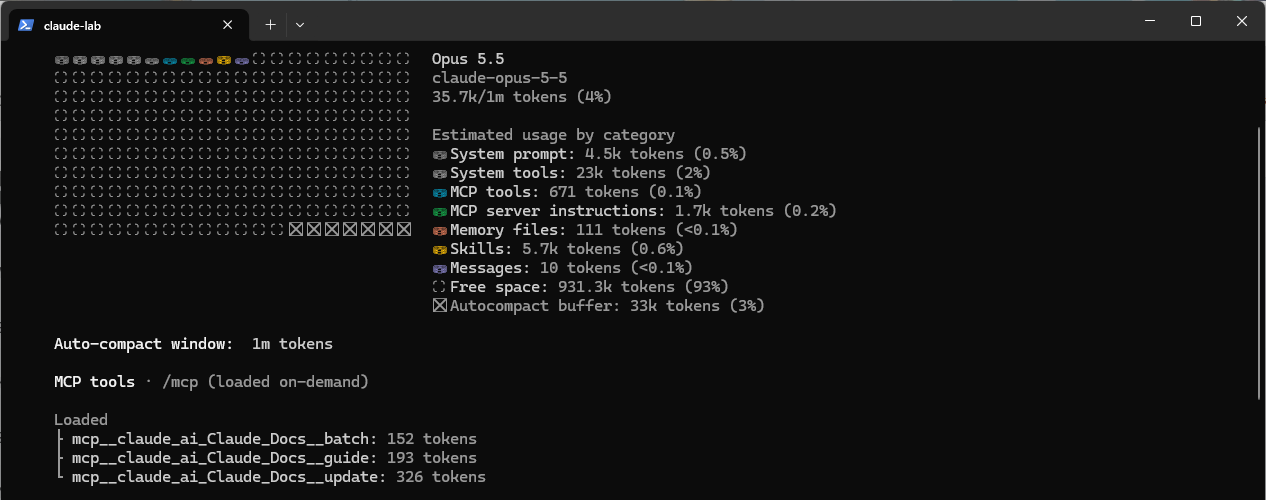 Image 1.
/context right after entering the session
In the test run, a new session used 35,700 out of 1 million tokens, about 4%; CLAUDE.md accounted for 111. The total on your machine will differ, depending on how many skills and MCPs you have installed. Anthropic's documentation says you rarely run out of room. The reason to keep things lean is still money and focus: each turn resends the entire conversation.
Type /exit to quit.
Step 2: Move the checking process into a skill, set commit and push rules
CLAUDE.md loads into every session; for a skill, Claude only sees the name and description, with the body loaded when needed. The "Checking" section from article 2 is a process, so it should become a skill. Create the folder and file:
mkdir .claude\skills\kiem-tra-trang
notepad .claude\skills\kiem-tra-trang\SKILL.md
Notepad may ask whether to create a new file, choose Yes; Notepad on Windows 11 opens a blank tab directly. With .md files, the new Notepad may enable formatting mode: click the word in the bottom bar to switch to Markdown syntax mode, so you see exactly each character you paste. Paste the following content, check that the bottom corner says UTF-8 (otherwise Vietnamese will break), then save with Ctrl+S:
---
description: Cách kiểm tra index.html sau khi sửa. Dùng khi cần xác nhận một thay đổi trên trang chạy đúng.
---
1. Mở index.html trực tiếp trong trình duyệt, không cần server.
2. Nền chuyển màu mất 0,3 giây: chờ rồi mới kiểm màu.
3. Bộ đếm lưu trong localStorage: kiểm cả sau khi tải lại trang.
4. Báo lại từng tiêu chí: đạt hay chưa, kiểm bằng cách nào.
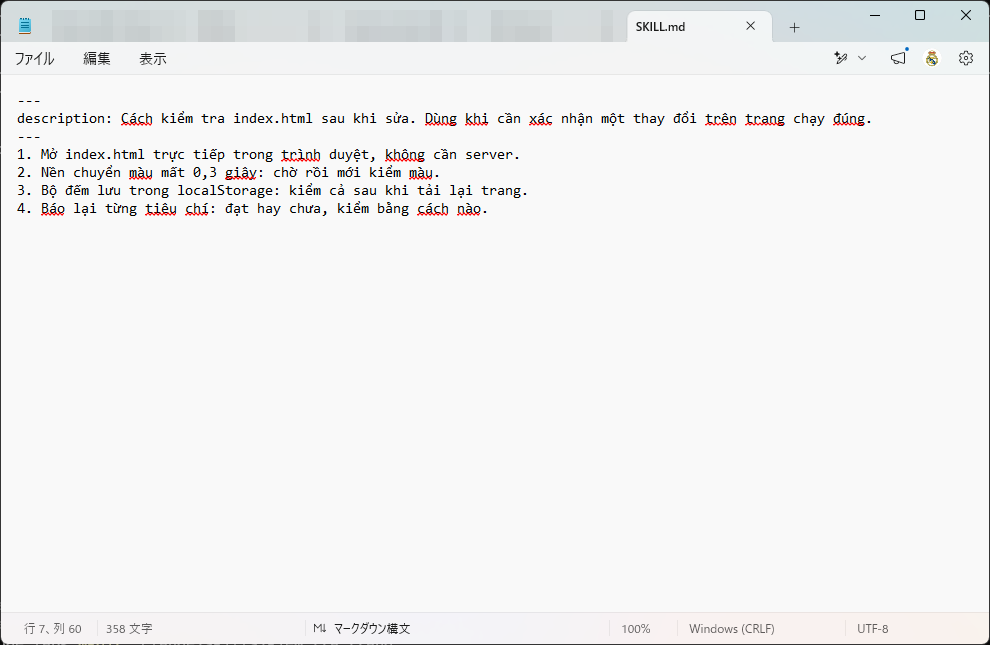 Image 2. SKILL.md in Notepad
Claude reads the description line to decide whether to use the skill, so write clearly when to use it. The folder name becomes the /kiem-tra-trang command.
Next, notepad CLAUDE.md, delete the "Checking" section and add the commit rules:
# Quy ước
- Chỉ HTML/CSS/JS thuần, không thêm thư viện.

# Commit
- Trước mỗi lần commit, hỏi tôi và chờ trả lời:
  1. Tên và email commit (git config user.name, user.email) đã đúng chưa.
  2. Message commit và danh sách file sẽ commit.
- Chỉ commit khi tôi trả lời đồng ý, kể cả ở auto mode.

# GitHub
- Trước khi push hoặc tạo repo, hỏi tôi. Repo mới luôn để private.
CLAUDE.md is only a set of instructions, not a guarantee. Add a rule that Claude Code enforces itself: notepad .claude\settings.json, paste:
{
  "permissions": {
    "ask": [
      "PowerShell(git commit *)", "Bash(git commit *)",
      "PowerShell(git push *)", "Bash(git push *)",
      "PowerShell(gh repo create *)", "Bash(gh repo create *)"
    ]
  }
}
According to the documentation, the ask rule still prompts for permission in auto mode. Each command needs both forms: on Windows, Claude runs commands mainly through PowerShell, and the Bash(...) rule does not apply to PowerShell. The push and gh repo create rules are for the GitHub part in step 6. CLAUDE.md decides what Claude asks, and settings.json ensures it must stop before the command.
Step 3: Create a read-only reviewer subagent
The subagent runs in its own context and only sends a summary back to the main session. It also does not see how the code was written, so it looks with fresh eyes.
mkdir .claude\agents
notepad .claude\agents\reviewer.md
Paste the following content and save:
---
name: reviewer
description: Đọc các file vừa sửa và so với tiêu chí được giao. Dùng sau khi viết xong một tính năng.
tools: Read, Grep, Glob
---
Bạn review code mà bạn không viết. So thay đổi với tiêu chí được giao,
chỉ báo những chỗ làm sai hoặc thiếu tiêu chí. Bỏ qua chuyện văn phong.
The tools line limits the reviewer to reading and searching, with no ability to edit files; Claude Code enforces this limit, not the instruction. Type tree /f .claude to check the directory tree.
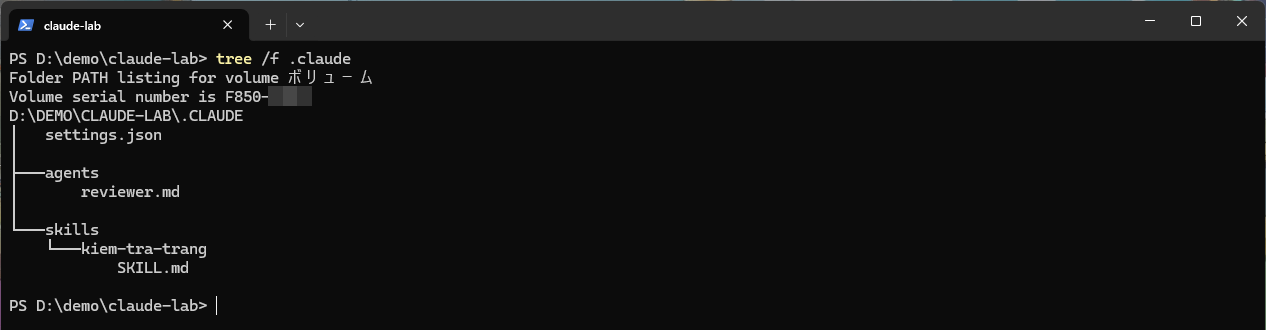 Image 3. The .claude directory tree after two steps
Step 4: One writing session, one review subagent
Type claude, then send the prompt to the writer:
Thêm dòng "Kỷ lục: N" dưới bộ đếm, N là số lần bấm cao nhất từng đạt. Xong là khi: bấm 5 lần, bấm Đặt lại, bấm 2 lần, tải lại trang, thấy Số lần bấm 2 và Kỷ lục 5. Chỉ sửa index.html.
The prompt does not mention the skill, but Claude loads kiem-tra-trang on its own. In the trial run, Claude edited index.html first, then loaded the skill to check. The Chrome extension was not connected, so Claude wrote a Node script outside the project to run headless Chrome, click the buttons according to the criteria and report each step as passed. If Claude asks to approve a command, read it and choose Yes.
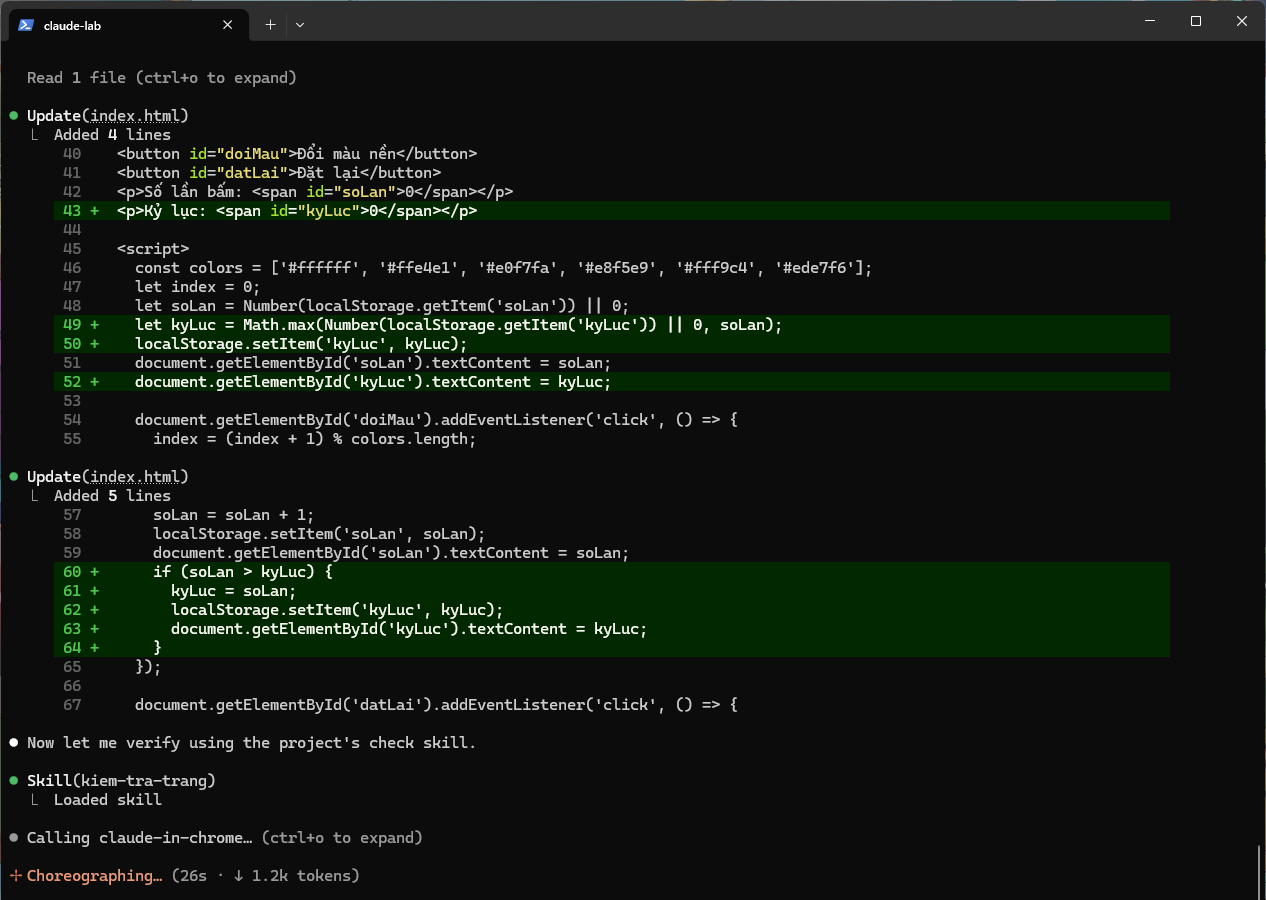 Image 4a. Claude finishes editing, then loads the skill to check
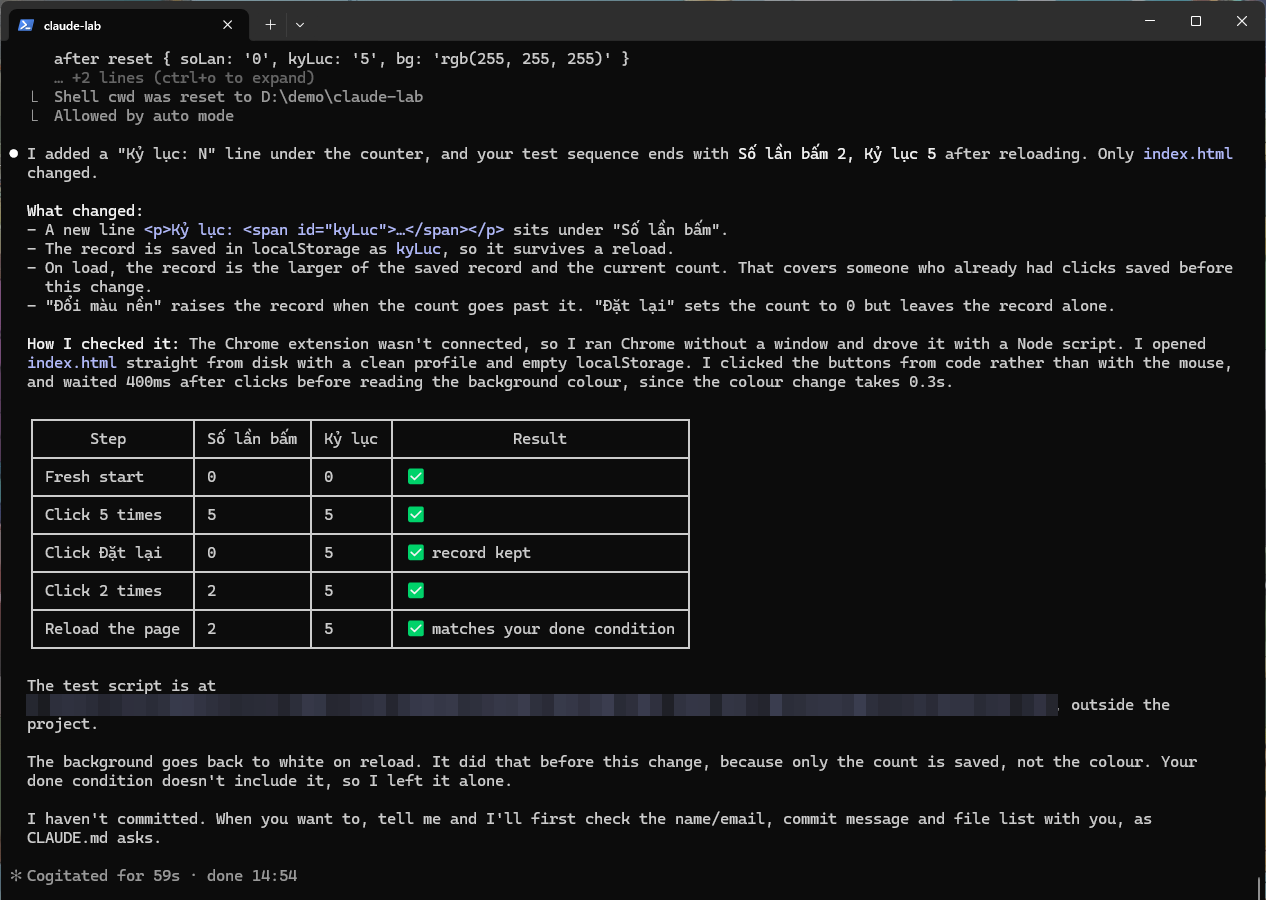 Image 4b. The writer reports results against the criteria
Now call the reviewer. Type @rev, use the arrow keys to select the reviewer (agent) line, press Tab, then continue typing:
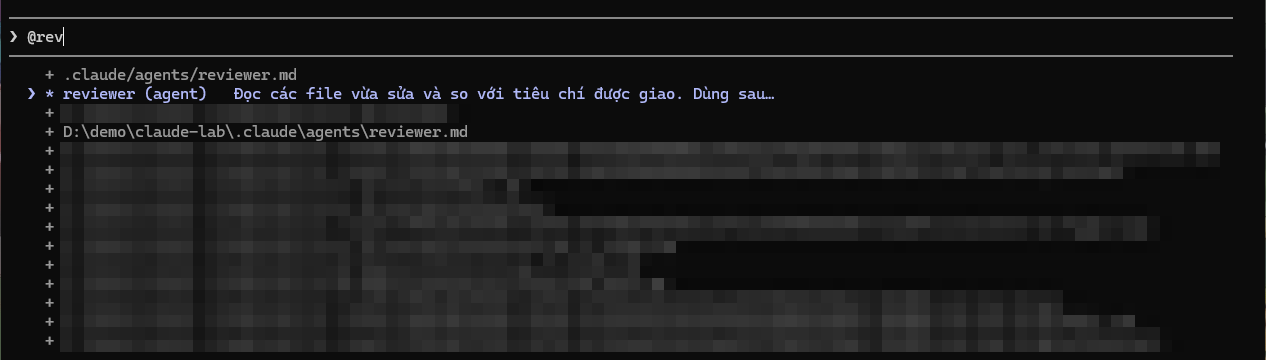 Image 4c. Selecting reviewer (agent) from the list
@"reviewer (agent)" kiểm index.html theo tiêu chí: Đặt lại không xóa kỷ lục, kỷ lục không bao giờ nhỏ hơn số lần bấm, cả hai còn nguyên sau khi tải lại. Chỉ báo lỗi làm sai tiêu chí.
The reviewer runs in the background, so it reports a few seconds later. In the trial run, it found no errors that violated the criteria, only noted an additional case outside the criteria (opening two tabs at once). No errors is a valid result: the documentation warns that a reviewer told to find problems will always find something, so the prompt only asks for errors that violate the criteria. The reviewer only reads the code and does not run the page, so you still need to open the page and check it yourself.
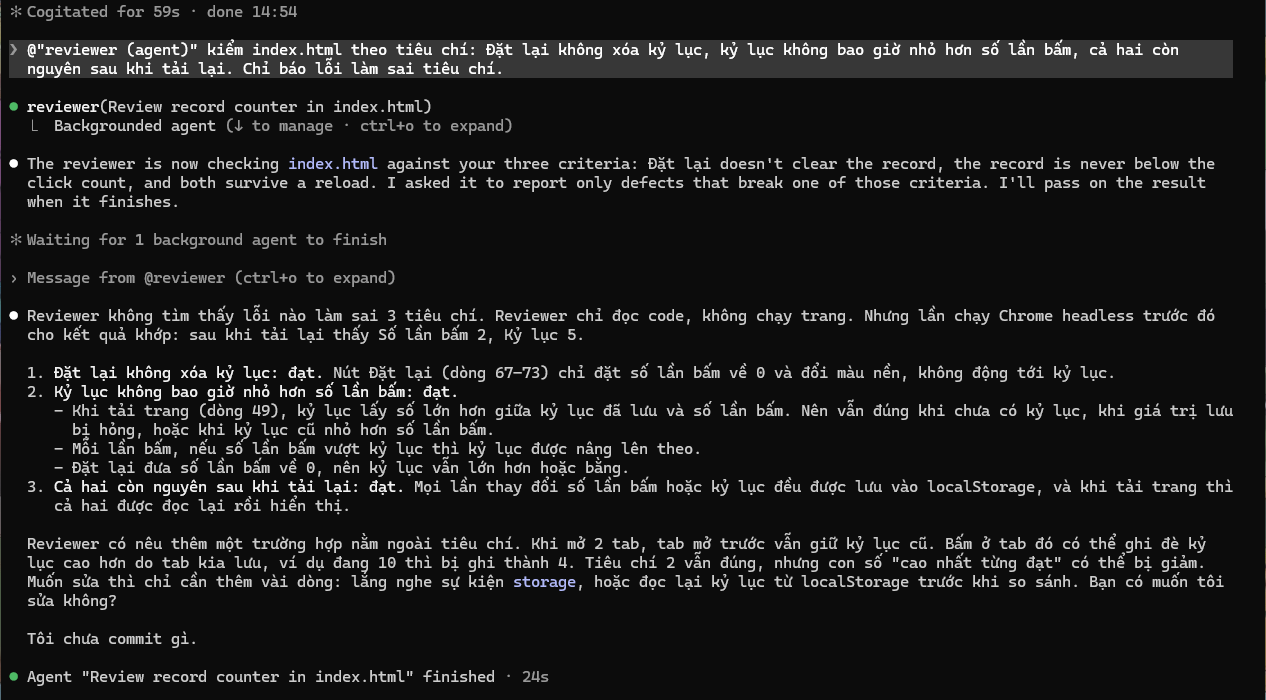 Image 4d. The reviewer returns results to the main session
Step 5: /compact or /clear
Type /context again. In the test run, context rose to 65,100 tokens, with messages accounting for 25,100. CLAUDE.md also grew from 111 to 166 tokens because the commit rule is longer than the section just removed (adding the GitHub section brings it to 209); the kiem-tra-trang skill adds about 40, and the reviewer adds 55. For this tiny project, the skill saves almost nothing.
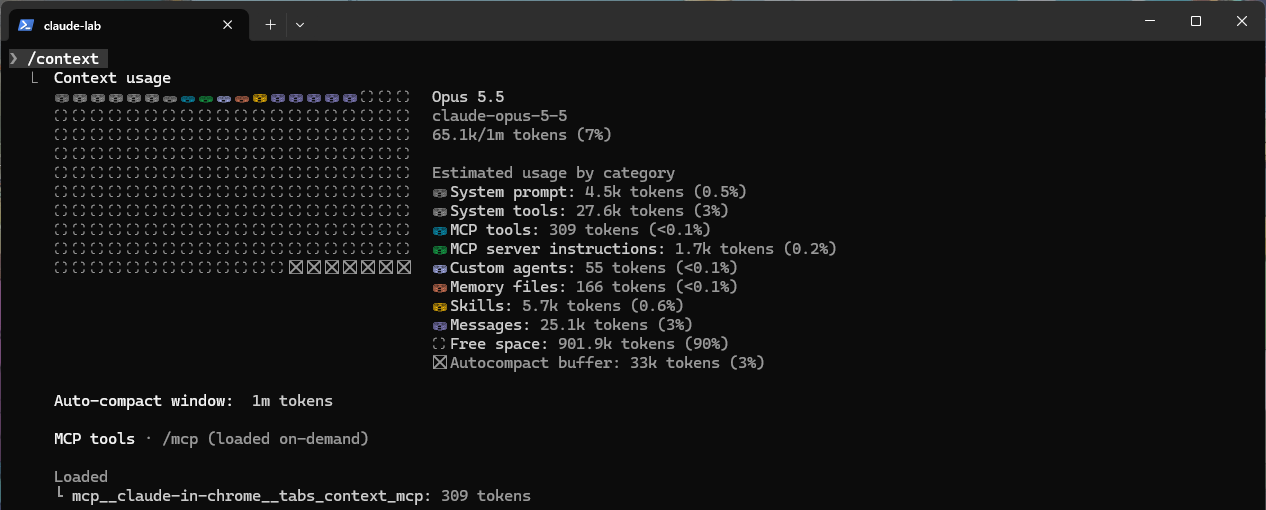 Image 5a.
/context after finishing the feature
/compact summarises the conversation, optionally with instructions on what to keep: /compact giữ tiêu chí kỷ lục và kết quả kiểm. Messages only fell from 25,100 to 18,700, because the conversation was short to begin with and Claude Code resets the summary, the files just read (index.html, the check script) and the skill just used. /clear wipes the conversation entirely: messages drop to 130 tokens, while CLAUDE.md and the skill descriptions are still reloaded as in a new session.
 Image 5b. /compact keeps the files and skill just used
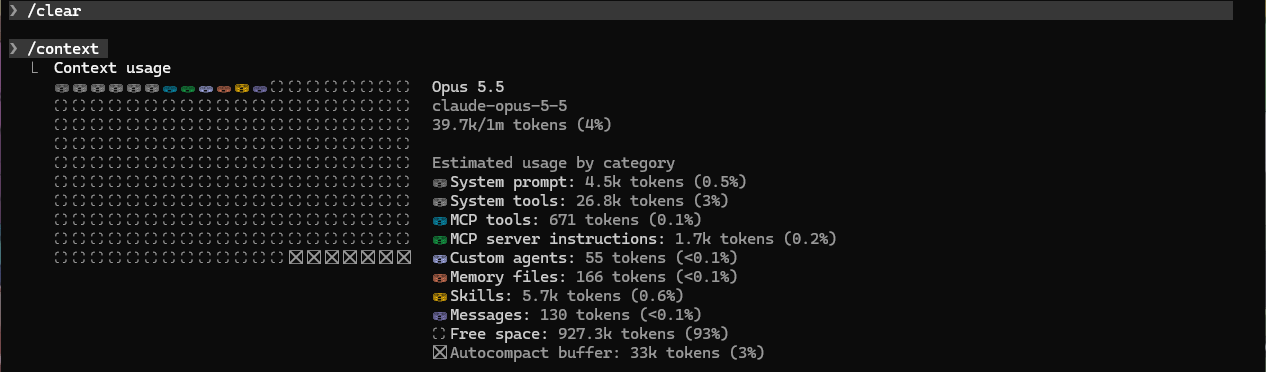 Image 5c.
/context after /clear
Switching tasks calls for /clear; midway through a long task, use /compact with a focus.
Step 6: Let Claude commit and push to GitHub
Still in the session, type Commit các thay đổi. As per CLAUDE.md, Claude reads the git configuration and then asks: are the name and email correct, what about the message and the list of files. In the test run, it asked via a selection box with two tabs, Tác giả and Commit; choose in each tab and then Submit answers.
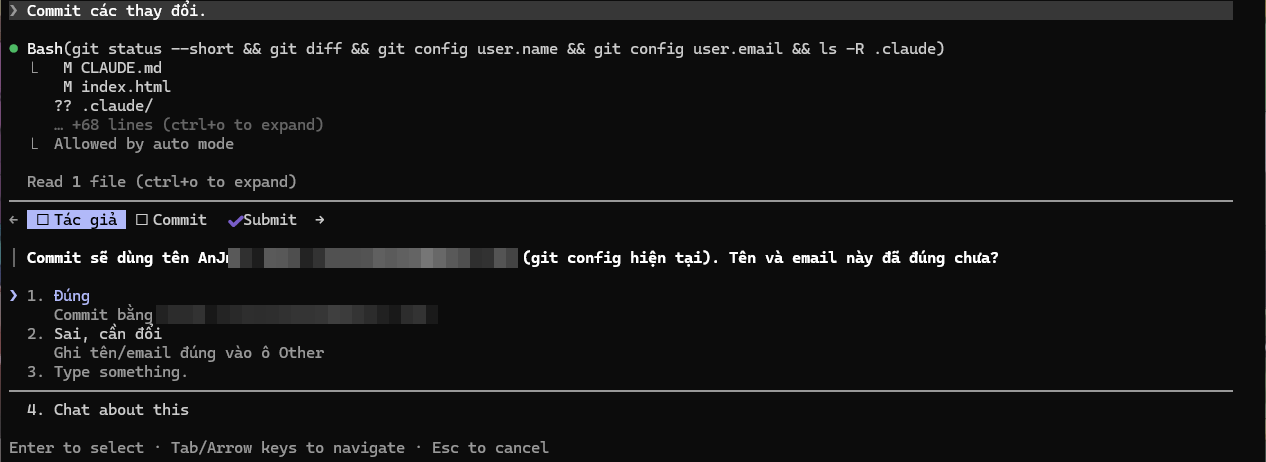 Image 6a. Claude asks two things before committing
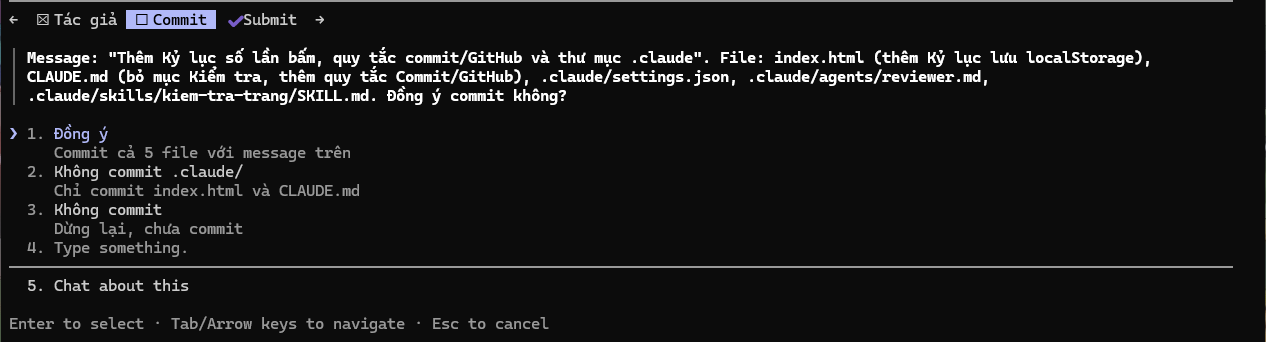 Image 6a2. Commit tab: message and five files
Read the file list carefully. In the test run, Claude included the .claude/ directory in the commit, along with a ready-made "Không commit .claude/" option. If your list is missing .claude/, choose Type something and type:
Đồng ý, nhưng thêm cả thư mục .claude/ vào commit.
A permission prompt appears with the line Rule ... (git commit *) ... overrides auto mode: the rule in settings.json is doing its job. On Windows, the box may say PowerShell instead of Bash. In the test run, the box only had 1. Yes and 2. No; choose 1. Yes. If your box has an extra option to always allow similar commands without asking, do not choose it.
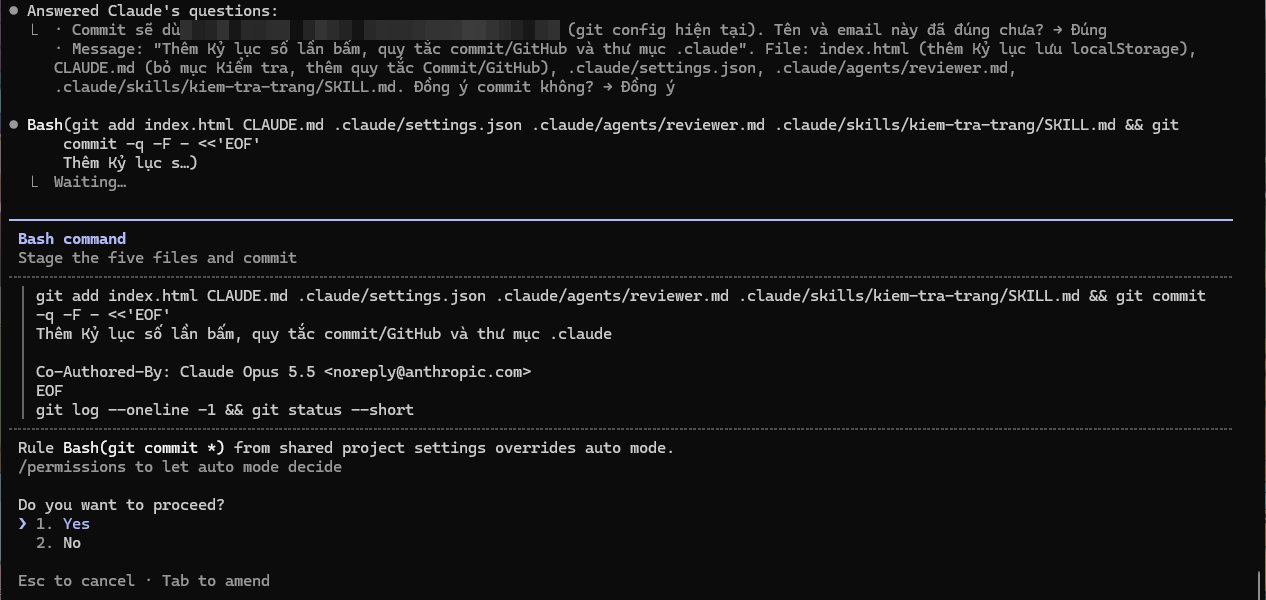 Image 6b. The ask rule forces a permission prompt even in auto mode
Claude commits all five files, with a Co-Authored-By line naming Claude; if you don't want that line, say so beforehand.
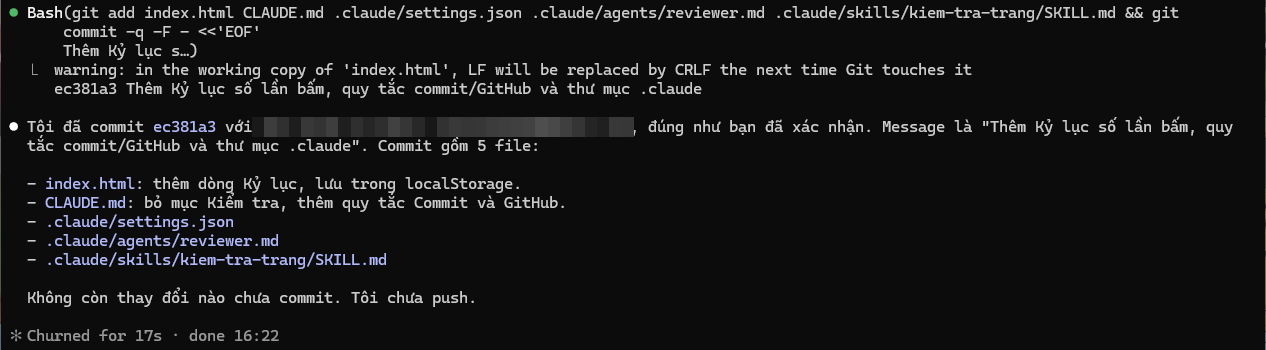 Image 6c. Commit done, correct author and all files present
Pushing to GitHub (optional)
This part gives you an online copy; skip it if you don't need one. Type /exit to leave Claude, then install the GitHub CLI yourself, since logging in later requires a browser:
winget install --id GitHub.cli --source winget
Windows shows a UAC box asking for install permission; choose Yes. If you let that box time out, winget reports that the user cancelled (code 1602); just run the command again. A machine that already has git still needs this install: git does not create repos on GitHub or log in to GitHub via a browser, and gh does both.
Open a new PowerShell window (a new tab is not enough), cd D:\demo\claude-lab, and type gh auth login. Choose GitHub.com, Login with a web browser, HTTPS in turn, then type Y for the question "Authenticate Git with your GitHub credentials?". gh prints a one-time code and copies it to the clipboard; press Enter to open the browser, sign in to GitHub, paste the code (if the page says the code is not found, type it manually), then Authorize. When the terminal reports Logged in as ..., you are done.
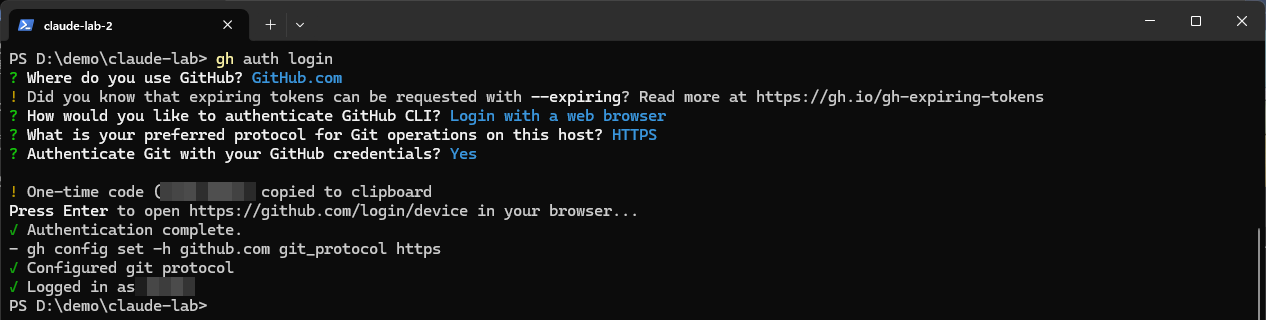 Image 6d1. gh auth login completed
Go back into claude and type:
Create a private repo named claude-lab on GitHub using gh, then push the code up.
Claude checks that the repo name is not taken, then asks, in line with CLAUDE.md: create a private repo, add the remote origin, push the current branch — do you agree? Choose Đồng ý (Agree); the permission prompt blocks once more with the line Rule PowerShell(gh repo create *) ... overrides auto mode; choose 1. Yes. The command gh repo create ... --push pushes inside gh, not through git push; that is why step 2 has the rule gh repo create *.
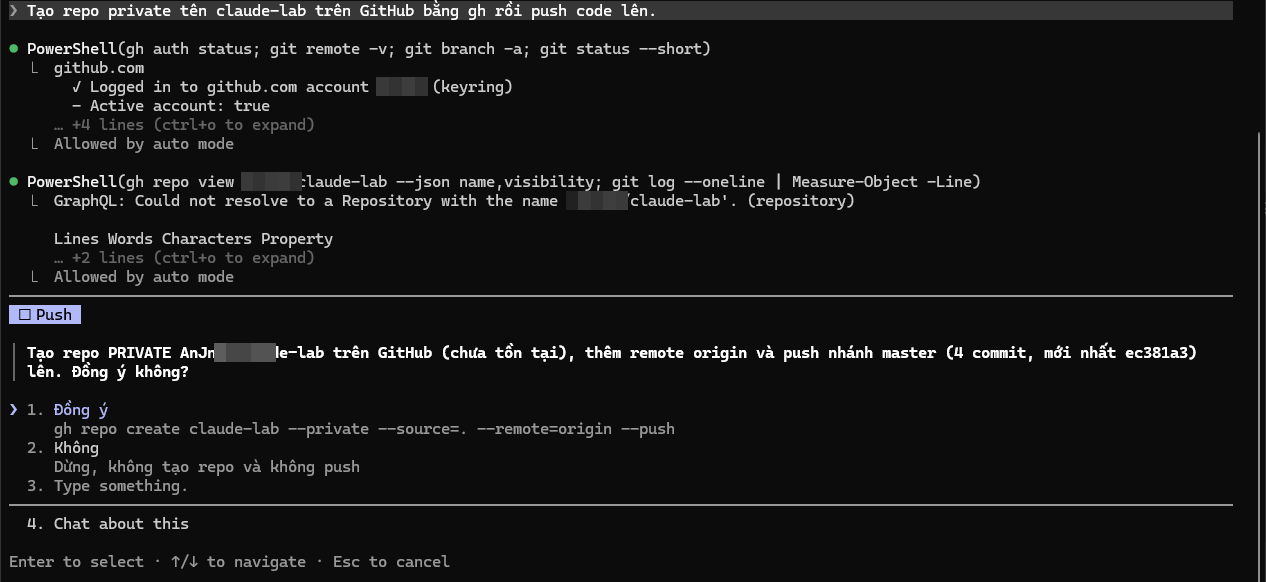 Image 6d. Asked twice before creating the repo and pushing
Claude reports the repo link and checks again on GitHub that the repo is private. The branch on GitHub carries exactly the name of the branch on your machine, here master.
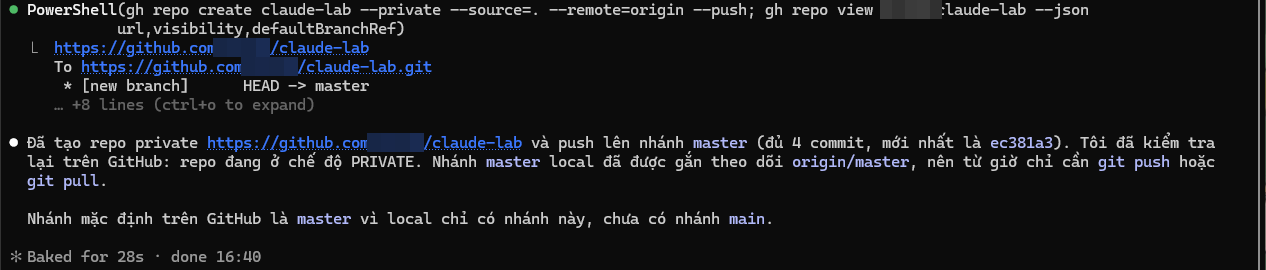 Image 6e. Private repo created and push completed
Keep it private. If you want to share it, switch to public later, but check the whole commit history first: no tokens, no sensitive information. A commit carries the name and email in your git config; if you do not want to expose your email, use GitHub's noreply address. Once something is public and you then notice a leak, you cannot take it back; if a token leaks, revoke it immediately.
When it is worth doing
A subagent is not smarter than the main session: by default it uses the same model or a smaller one, and it costs extra usage turns. What you buy is a pair of eyes that did not see the code being written and narrower permissions. A skill is worth it when the procedure is long, not four lines as here.
There is still one gap. Skills and CLAUDE.md are advice. The ask rule is mandatory but only matches the wording of the command, so the documentation says it is not a security barrier. Article 4 uses hooks to automatically block and check the things permission rules cannot do.
Source: Explore the context window; Best practices; Extend Claude with skills; Create custom subagents; Commands; Permissions; Permission modes; Install GitHub CLI on Windows; gh auth login; gh repo create.
Comments
No comments yet. Be the first!
You need to sign in to comment.